Permanence demands perfection. In 2026, you no longer have to guess how a script will look on your skin. From advanced AI lettering engines to classic typography tools, we break down how to visualize your next text tattoo before the needle touches skin. Finding the right tattoo fonts and lettering generator is the first critical step in bridging the gap between a vague idea and a piece of permanent art.
For decades, clients walked into shops with crumpled printouts or relied entirely on an artist’s freehand sketch. However, the landscape has shifted dramatically. Today, whether you are looking for a simple typewriter font or a complex ambigram, technology allows you to test, warp, and preview designs directly on your body using AR. Therefore, utilizing a high-quality tattoo text creator is essential for communicating your vision effectively. In this guide, we explore the best tools of 2026 to ensure your ink ages beautifully.
The Evolution of Tattoo Typography: Fonts vs. Custom Lettering
Defining Tattoo Fonts (Typeface-based)
Tattoo fonts are essentially digital typefaces that have been installed on a computer and can be typed out using a keyboard. Generally, these are pre-designed sets of characters with fixed weights, spacing, and styling. In the context of a tattoo fonts and lettering generator, these tools pull from vast libraries of existing typefaces—ranging from standard Times New Roman to stylized Gothic scripts. Consequently, the primary advantage of using a font is consistency; you know exactly what every letter will look like before you commit. Furthermore, it allows for rapid iteration, letting you swap between a serif and a sans-serif style in seconds to see what resonates with your aesthetic.
However, the rigidity of fonts can sometimes be a drawback for body art. Because human bodies are not flat surfaces like paper or screens, a static font might look warped or awkward when placed on a curved muscle. In 2026, advanced generators attempt to mitigate this by offering warping features, but the core building block remains a static digital file. Thus, while a calligraphy generator is an excellent starting point, it often requires human intervention to make the text flow naturally with the body’s unique anatomy.
Defining Custom Lettering (Hand-drawn & Generative)
In contrast to static fonts, custom lettering is the art of drawing words specifically for a single design. Historically, this was done exclusively by hand, where a tattoo artist would sketch the script directly onto the skin with a marker to ensure it fit the muscle flow perfectly. Today, custom ink design has evolved to include generative AI tools that create unique letterforms that do not exist as standard fonts. This approach allows for flourishes, ligatures, and swashes that interact with each other in ways a standard keyboard typeface cannot achieve.
Can You Get Rich Off Stocks? Find Out Now!Moreover, true custom lettering offers an level of exclusivity that fonts cannot match. When you use a standard font, thousands of other people might have the exact same tattoo. On the other hand, custom lettering ensures your tattoo script maker output is a one-of-a-kind piece of art. In 2026, the line is blurring, as AI tools can now mimic the ‘hand-drawn’ feel, generating variations of letters so that double letters (like the ‘tt’ in ‘lettering’) don’t look identical, mimicking the natural variation of a human hand.
Why typography matters in tattoo aging (Ink spread)
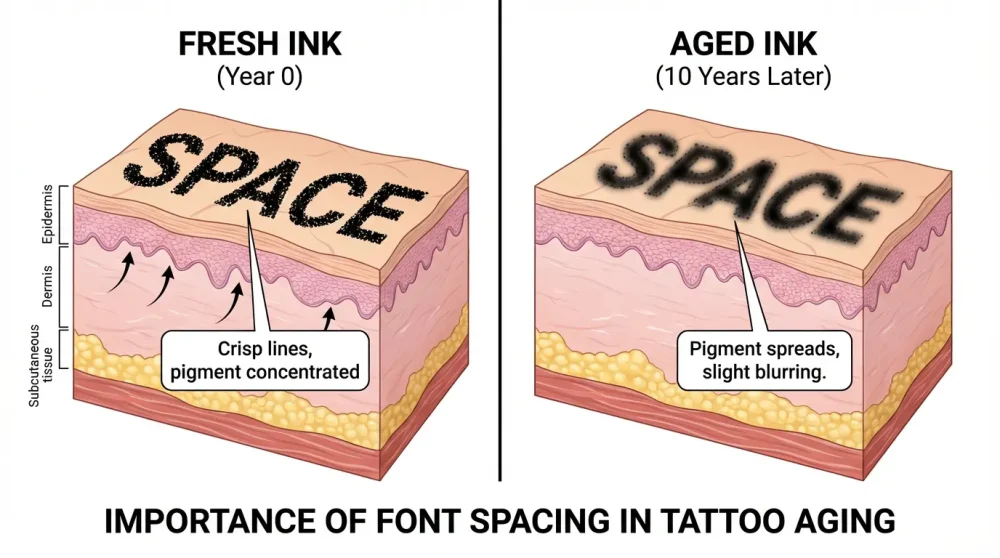
One of the most critical, yet often overlooked, aspects of tattoo design is how the ink will age over time. Ink migration, commonly known as ‘blowout’ or simply the natural spreading of pigment under the dermis, happens to every tattoo as macrophages in the immune system attack the ink particles. Therefore, a tattoo fonts and lettering generator that looks good on a screen might result in an illegible blob ten years down the line if the spacing is too tight. Typography for tattoos must account for this inevitable spread by exaggerating the kerning (space between letters) and the counters (the open spaces inside letters like ‘e’ and ‘a’).
Consequently, professional tattoo artists often warn against using standard web design fonts that are optimized for high-resolution screens rather than biological canvas. If the negative space in a loop is too small, it will eventually close up, turning an ‘e’ into a solid black dot. Furthermore, bold lines expand more noticeably than fine lines. Thus, understanding the weight of the font relative to the size of the final tattoo is paramount for longevity. Tools in 2026 are beginning to include ‘aging simulation’ filters to show users how their text might look after a decade of settling.
10 AI Game Generator Tools to Create Games InstantlyThe limitations of standard Google Fonts for tattoos
While Google Fonts is an incredible resource for web designers, it is often a trap for tattoo enthusiasts. These fonts are engineered for readability on backlit LED screens, utilizing precise geometric perfection that often looks lifeless on organic skin. Additionally, many of these fonts lack the stylistic flair or ‘flow’ required for a dynamic tattoo placement. A standard sans-serif might look clean on a website header, but on a forearm, it can appear sticker-like and uninspired. As a result, relying solely on general-purpose typography often leads to ‘cookie-cutter’ tattoos that lack character.
Furthermore, standard fonts rarely account for the three-dimensional nature of the body. They are designed to sit on a 2D plane. When you wrap a rigid Google Font around a wrist or ankle, the straight lines distort visually, appearing bent or crooked. Dedicated tattoo text creator tools or working with an artist who understands lettering is necessary to correct this perspective. Therefore, while Google Fonts can serve as a loose reference, they should rarely be the final stencil without modification.
Digital Mockups vs. Freehand Stencils
Digital mockups have become the standard for client consultations in 2026. Using a typography visualizer, artists can overlay a font onto a photo of the client’s body, providing a ‘what you see is what you get’ experience. This is incredibly valuable for checking spelling, size, and general placement. It eliminates the anxiety of the unknown and allows for collaborative adjustments before the stencil is even printed. For example, a client can instantly see that a blackletter generator output is too heavy for their collarbone and opt for a finer script instead.
Tokenized Real Estate Crowdfunding Legal Compliance: The Ultimate 2026 GuideHowever, there is a magic to freehand stenciling that digital tools struggle to replicate. A master lettering artist will draw directly on the skin with surgical pens, following the microscopic topography of the muscle and bone structure. This method ensures that the tattoo moves with the body, rather than sitting on top of it. While a free tattoo font generator with preview on body is a powerful planning tool, the final adjustment should often be left to the artist’s hand at the appointment to ensure the flow is anatomically correct.
Top Static Tattoo Font Generators (Classic Tools)
DaFont: The massive repository for specific styles
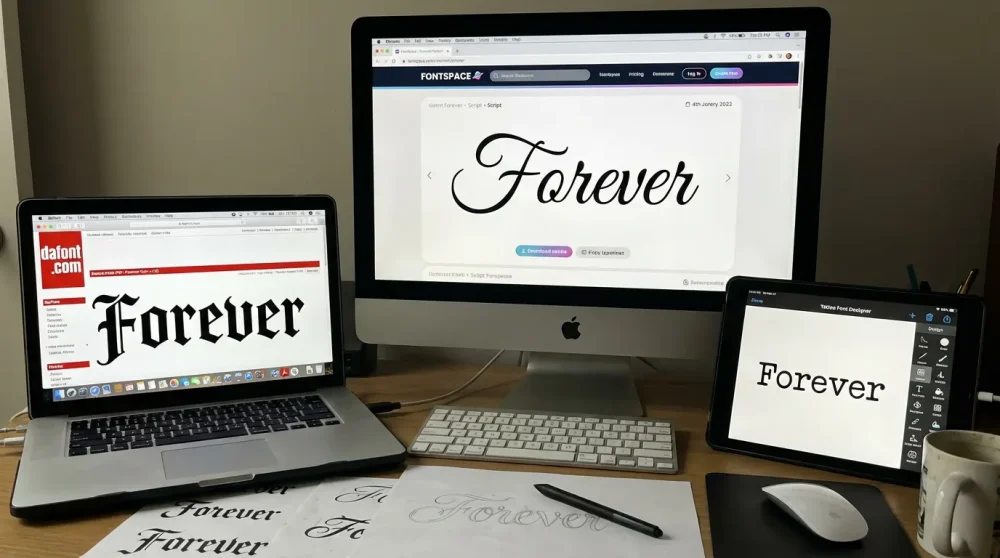
Even in 2026, DaFont remains a titan in the world of typography, serving as the go-to repository for millions of users. Its primary strength lies in its sheer volume and categorization. Users can specifically filter for ‘Calligraphy’, ‘Old School’, or ‘Gothic’ to narrow down thousands of options for their tattoo. Because of this extensive library, it acts as a premier calligraphy generator resource where you can type in your custom phrase and instantly see it rendered in hundreds of different styles. This immediate visual feedback is crucial for narrowing down the ‘vibe’ of the piece.
However, the platform’s vastness can also be a weakness; the quality control varies significantly. Many fonts are amateur creations with poor kerning or incomplete character sets. Therefore, users must be diligent in checking the details of the font before falling in love with it. Additionally, DaFont allows users to preview text without downloading, making it a quick and efficient tool for brainstorming. For anyone looking for a cursive tattoo fonts collection, this remains the first stop on the internet.
NVIDIA’s ‘Data-Sovereign’ Chip is the hardware star of Gartner 20261001 Fonts: Commercial use filtering
1001 Fonts distinguishes itself by placing a heavy emphasis on licensing and commercial use, which is vital for tattoo artists who design custom flash sheets for sale. Unlike other repositories that are a ‘wild west’ of copyright, 1001 Fonts allows users to strictly filter for fonts that are free for commercial use. This feature provides peace of mind for artists who want to avoid legal gray areas when selling their designs. Furthermore, the site offers robust tagging systems, making it easier to find niche styles like ‘distressed’ or ‘brush’ scripts.
In addition to licensing safety, the interface is clean and offers a variety of text preview options, including changing the background color to simulate skin tones. While it may not have the dedicated ‘body preview’ features of a specialized tattoo stencil maker, its reliability makes it a staple for professionals. Consequently, if you are an artist looking to build a legal library of assets, 1001 Fonts is the superior choice over less regulated platforms.
FontSpace: User-friendly interface options
FontSpace has carved out a niche by offering a more modern, user-friendly experience compared to its older competitors. The site features a curated collection that often feels less cluttered, focusing on high-quality uploads from reputable designers. One of its standout features is the ability to save collections, allowing users to build a ‘mood board’ of potential old english font generator outputs or scripts. This is particularly helpful for clients who are undecided and want to compare three or four top choices side-by-side.
Moreover, FontSpace frequently highlights trending fonts, giving users a glimpse into what is currently popular in the design world. In 2026, this often includes modern minimalist and single-line aesthetic fonts that are popular among Gen Z. Thus, for users who find DaFont too overwhelming, FontSpace offers a streamlined alternative without sacrificing variety. It effectively bridges the gap between a professional design tool and a consumer-accessible gallery.
Tattoo Font Designer App features
Moving away from web repositories, the ‘Tattoo Font Designer’ app represents the shift toward mobile-first design tools. This app is specifically engineered for tattoo visualization, offering features that generic font sites lack. For instance, it allows users to import a photo of their body part and overlay the text directly, acting as a rudimentary font preview on skin tool. This context is invaluable; seeing a design on a white screen is vastly different from seeing it on your own arm.
Furthermore, the app often includes editing tools that allow for text bending and curving—features that are essential for fitting text around limbs. Instead of flat text, you can manipulate the arch to match the curve of a bicep or a ribcage. As a result, this app serves as a bridge between a simple tattoo text creator and a full-fledged design suite. It empowers users to walk into a tattoo shop with a much clearer reference image than a simple text printout.
Pros and Cons of static font libraries
The primary advantage of static font libraries is accessibility and predictability. They are almost always free to try, instant to generate, and offer a perfect preview of the letterforms. You know exactly what you are getting, and the lines are mathematically perfect. For styles like typewriter text or standard block letters, a static font is often the best choice because irregularity is not desired. Therefore, for precise, geometric designs, these libraries are unbeatable.
On the other hand, the biggest con is the lack of uniqueness and organic flow. A static font repeats the exact same shape for every ‘e’ or ‘s’, including fonts for the letter s, which can look mechanical and artificial on the human body. Additionally, they do not account for muscle movement or skin texture. Consequently, a tattoo derived solely from a static font can feel like a stamp rather than a piece of art. To truly elevate the design, one must often combine these static tools with manual customization or the artist’s touch to breathe life into the letters.
Next-Gen AI Lettering Generators & Ambigram Makers
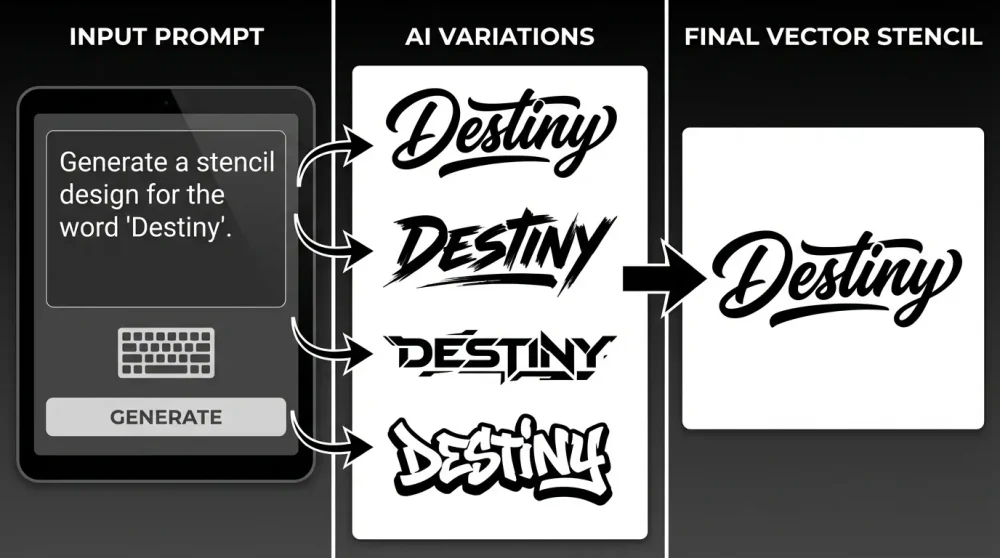
How Generative AI creates unique lettering in 2026
In 2026, Generative AI has fundamentally changed the workflow for custom lettering. Unlike static font generators that pull from a database of pre-existing letters, AI models generate pixels from scratch based on semantic understanding. This means you can ask an AI tattoo designer for ‘smoke-like calligraphy’ or ‘letters made of bones,’ and it will synthesize entirely new forms that no typographer has ever drawn. This capability allows for a level of conceptual depth previously impossible with standard tools.
Furthermore, these AI engines understand style blending. You can request a fusion of ‘Graffiti’ and ‘Victorian Script,’ and the AI will hallucinate a hybrid style that merges the aggression of street art with the elegance of 19th-century penmanship. As a result, the output is a truly custom piece of art. However, it is important to note that AI output is often raster-based (pixels) rather than vector-based, meaning it may require some cleanup before it can be used as a crisp stencil.
Using Midjourney v7 and DALL-E for text-based tattoo concepts
By 2026, tools like Midjourney v7 and the latest DALL-E iterations have largely solved the ‘gibberish text’ problem that plagued earlier AI models. Users can now prompt specific words with high accuracy, placing them inside complex illustrations. For example, a prompt like “/imagine a tattoo design of a rose with the word ‘Family’ wrapped around the stem in elegant cursive script, white background, high contrast” yields usable results. This makes these platforms powerful AI generators for custom tattoo script concepts.
However, while they can spell correctly, they still prioritize aesthetics over strict typographic rules. The spacing might be inconsistent, or a letter might blend too much with the background elements. Therefore, these tools are best used for generating the *concept* and *style* of the lettering, which a human artist can then refine. They serve as an infinite inspiration engine, allowing you to iterate through fifty variations of a script style in minutes before selecting the perfect direction.
Dedicated AI Tattoo Generators (InkAI, Tattoon, etc.)
Beyond general image generators, 2026 has seen the rise of niche AI platforms trained specifically on tattoo flash, such as InkAI and Tattoon. These tools are finetuned to understand the constraints of tattooing—such as line weight, shading limitations, and skin contrast. When you use a dedicated tattoo script maker on these platforms, the output is often already optimized for a stencil, with clean black lines and minimal unnecessary detail. This differentiates them significantly from general art generators.
In addition, many of these dedicated tools offer features like ‘virtual try-on’ integrated directly into the generation process. You can upload a photo of your arm, generate a script, and the AI will not only create the text but also warp it and apply lighting effects to make it look like it’s already healed on your skin. This end-to-end workflow makes them the premier choice for users who want a turnkey solution for visualizing their custom ink design.
Generating Ambigrams (Words that read upside down)
Ambigrams—words designed to be read from multiple orientations—are notoriously difficult to design by hand. Historically, only a handful of specialists could create high-quality ambigrams. Today, an AI-powered ambigram maker can analyze the structural similarities between letters and generate these optical illusions in seconds. For instance, creating a design that reads ‘Life’ one way and ‘Death’ when flipped upside down is now accessible to anyone.
Moreover, these tools allow for rapid stylistic testing. You can see how the ambigram looks in a Blackletter style versus a Chicano script instantly. Because ambigrams require compromising the legibility of certain letters to make the dual-reading work, having an AI generate multiple options allows you to choose the one that balances readability best. Thus, for anyone seeking this mind-bending style, AI tools are a non-negotiable part of the process in 2026.
Prompt engineering for specific calligraphy styles
Getting the best results from an AI tattoo designer requires a new skill: prompt engineering. Simply typing ‘tattoo font’ will result in generic outputs. To get professional-grade results, one must use specific terminology. Descriptors like ‘copperplate’, ‘Spencerian script’, ‘monoline’, ‘brush pen texture’, and ‘high contrast’ help guide the AI toward a specific aesthetic. Furthermore, specifying the mood—such as ‘aggressive’, ‘melancholic’, or ‘romantic’—can influence the flourish and weight of the strokes.
Additionally, negative prompting is crucial. Telling the AI what *not* to do (e.g., ‘–no shading, –no colors, –no 3D effects’) ensures the output is suitable for a tattoo stencil. A clean, black-and-white line drawing is much easier for an artist to work with than a photorealistic 3D render. Therefore, mastering the language of prompting is the key to unlocking the full potential of these generative tools.
Vectorizing AI output for stencils
Once an AI has generated a beautiful piece of lettering, the final step is converting that raster image into a vector format for the stencil machine. Tattoo artists use thermal printers that require crisp, high-contrast lines. An image generated by Midjourney might have soft edges or gray artifacts that confuse the printer. Consequently, using a tattoo stencil maker or vectorization software (like Adobe Illustrator or online converters) is a necessary bridge step.
This process involves tracing the pixels to create scalable paths. In 2026, many AI tools have built-in ‘vectorize’ buttons, but manual adjustment is often better. This step is also where you can clean up any AI artifacts—stray dots or weird connections between letters. By converting the design to a vector, you ensure that the stencil applied to your skin is sharp, readable, and exactly what you intended, preventing the dreaded ‘fuzzy stencil’ issue.
Popular Tattoo Font Styles & When to Use Them
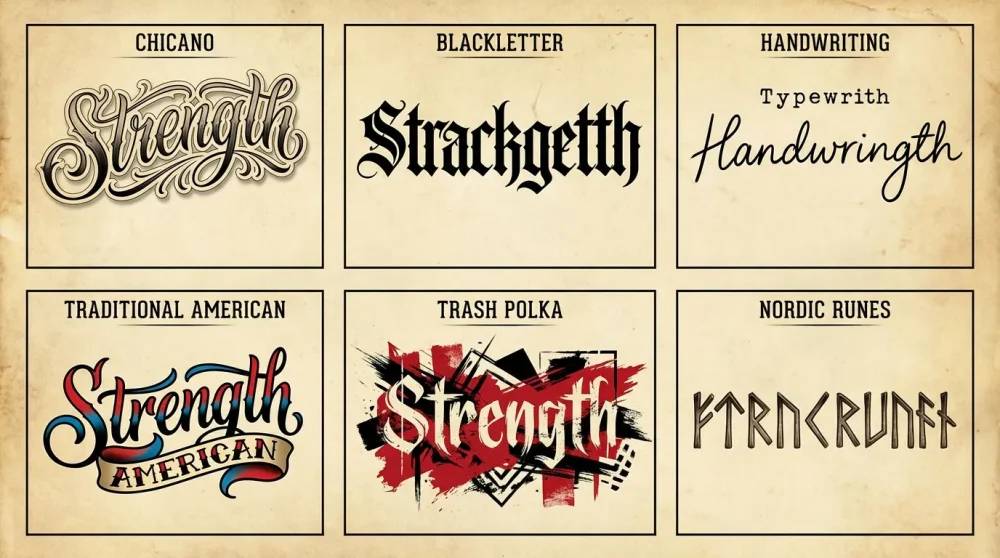
Chicano & Gangsta Script: Complexity and shading
Chicano and Gangsta scripts are characterized by their intricate flourishes, dramatic shading, and bold, aggressive stance. Originating from the street culture of Los Angeles and prison art, this style has evolved into a global phenomenon. A chicano lettering creator often focuses on exaggerated capitals and long, sweeping tails that can wrap around a forearm or shin. The beauty of this style lies in its complexity; it is not meant to be read at a glance but admired as a decorative composition.
However, this complexity demands space. These fonts are ill-suited for small areas like fingers or behind the ear because the fine shading and tight loops will bleed together over time. They shine best on large, flat canvases like the chest, back, or outer thigh. Furthermore, true Chicano script often incorporates ‘filigree’ and background shading, making it more than just text—it is a full image. Therefore, using a chicano style lettering generator free can give you a baseline, but a skilled artist is needed to execute the subtle fades that give this style its 3D look.
Blackletter & Old English: The classic bold look
Blackletter, often referred to interchangeably with Old English, is the undisputed king of tattoo typography. Its dense, heavy strokes and angular construction make it incredibly readable and durable. A blackletter generator is perfect for last names, year dates (like ‘1990’), or powerful single-word statements like ‘Loyalty’ or ‘Respect’. The sheer weight of the ink ensures that these tattoos hold up remarkably well over decades, fading far less than fine-line scripts.
Nevertheless, the rigid blockiness of Blackletter can feel static. To modernize it, artists often add ‘fractures’ or texture effects to make the letters look like carved stone or distressed metal. In 2026, we see a trend of mixing Blackletter with modern design elements, such as glitch effects or trash polka splashes. This style is incredibly versatile, working well on the stomach (belly rockers), knuckles, and upper back. It commands authority and is not for the subtle.
Minimalist & Typewriter: The Gen Z/Alpha trend
On the opposite end of the spectrum is the minimalist and typewriter trend. This style mimics the mechanical, imperfect imprint of an analog typewriter, often using a monospaced font like Courier. A typewriter font for tattoos appeals to those who value nostalgia, literature, and understatement. It is the style of choice for favorite quotes, poetry excerpts, or dictionary definitions. The aesthetic is raw and unpolished, often retaining the ‘ink bleed’ look of a real typewriter key.
Because these fonts are usually fine-line, they carry a risk of fading or falling out during the healing process if not applied correctly. They require a delicate hand. Placement is key here; these tattoos look best in intimate, smaller spots like the inner bicep, wrist, or ribcage. They are less about decoration and more about the message itself. Thus, readability is the primary goal, and the design should remain uncluttered.
Handwriting & Signature Styles: Memorial tattoos
One of the most emotional applications of tattoo typography is preserving the handwriting of a loved one. Whether it is a signature from an old birthday card or a note from a parent, a handwriting to tattoo converter or simply scanning the original document is a powerful way to carry a memory. Unlike generated fonts, these designs embrace the imperfections—the shaky line, the unique loop of a ‘y’—that make the handwriting authentic.
In scenarios where the original sample is poor quality or incomplete, artists can use AI to extrapolate the missing letters in the same style, creating a full alphabet from a few words. This ‘synthetic handwriting’ allows you to write a new phrase in a passed loved one’s style. While this raises ethical questions for some, for many, it is a comforting way to complete a tribute. These tattoos are deeply personal and are often placed in visible areas like the forearm or wrist where the wearer can see them daily.
Traditional American (Sailor Jerry) Typography
Traditional American typography is rooted in the history of sailing and the military. Think of the classic ‘Mom’ heart banner or the bold, simple letters on a Sailor Jerry flash sheet. These fonts are usually serifed, bold, and colored with simple gradients or solid black. They are designed for maximum legibility from a distance and durability in harsh conditions. They are the antithesis of the delicate cursive tattoo fonts; they are loud and proud.
This style is timeless. A banner with Traditional lettering will look as good in 50 years as it does today. It pairs perfectly with other Traditional imagery like eagles, anchors, and roses. If you are building a ‘patchwork sleeve’ of traditional tattoos, sticking to this font style is essential for cohesion. It rarely requires a complex generator; simple reference sheets from the 1940s and 50s are often the best source material.
Trash Polka Typography features
Trash Polka is a graphic style that originated in Germany, combining realistic imagery with chaotic graphic elements like brush strokes, splatters, and bold typography. The text in Trash Polka is treated as a graphical element rather than just words. It often varies wildly in size, is sometimes partially obscured, or is printed in bold red and black contrasting blocks. A standard tattoo text creator is usually insufficient for this; you need a design tool that allows for layering and collage.
The typography used is often a mix of rigid sans-serif headlines (newspaper style) and loose, aggressive handwriting. The juxtaposition creates tension and energy. This style is best suited for large-scale work like full sleeves or chest pieces where the chaotic composition has room to breathe. It is a bold, artistic statement that uses text to create texture and rhythm within the tattoo.
Nordic Runes and Ancient Scripts
Finally, ancient scripts like Elder Futhark (Nordic Runes) or Ogham remain popular for their mystical and historical connection. These are not ‘fonts’ in the modern sense but alphabets of symbols. Using a specialized generator for these is crucial to ensure accurate translation. A common mistake is a simple letter-for-letter swap (transliteration) which often results in gibberish. A good tool will account for the phonetic sound of the words rather than just the spelling.
Visually, these scripts are angular and geometric, making them perfect for linear placements like the spine or down the center of a limb. They carry a heavy, primal aesthetic that works well with blackwork and geometric tattoo styles. Because they are often simple lines, they age very well, provided the lines are not placed too close together. For enthusiasts of Viking or Celtic heritage, these scripts offer a connection to ancestry that modern English fonts cannot provide.
Anatomy & Placement: Visualizing the Design
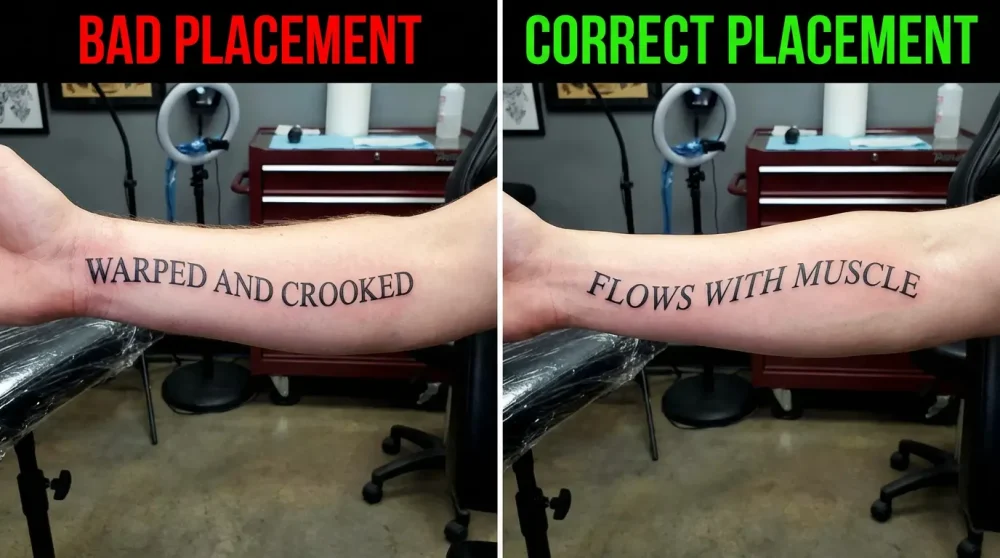
Using AR (Augmented Reality) apps to try fonts on skin
The gap between imagination and reality is bridged by Augmented Reality. In 2026, the best app for tattoo lettering design 2026 will invariably feature a live AR camera mode. This allows you to hold your phone up to your arm and see the text floating on your skin in real-time. You can rotate your arm, and the text tracks with the movement, giving you a genuine sense of scale and perspective. This is a massive leap forward from static Photoshop overlays.
AR tools help identify issues that are invisible on a flat screen. For instance, you might realize that a long sentence wraps too far around your wrist, making it impossible to read without twisting your arm. Or you might find that a certain font weight looks too delicate against your skin tone. By using a free tattoo font generator with preview on body capabilities, you can make these decisions at home, saving valuable consultation time with your artist.
Curving text for ribs, collarbones, and forearms
The human body has no straight lines. Therefore, straight text often looks awkward and ‘stuck on’. Curving text to follow the natural musculature is essential for a harmonious flow. A good typography visualizer allows you to apply an arch or a wave to the text. For a collarbone tattoo, the text should gently arch upward or downward to mimic the bone’s shape. On the ribs, it might need to follow the curve of the rib cage.
For forearms, the challenge is often the tapering shape of the arm. Text that is the same size at the wrist and the elbow can look unbalanced. Advanced generators allow for ‘envelope warping’, where the text can be tapered—smaller at the wrist and larger at the elbow—to maintain visual consistency. This technique ensures the tattoo looks organic, integrated with the body’s geometry rather than fighting against it.
Vertical lettering for spine placements
Spine tattoos are a stunning placement for text, but they present unique challenges. You have two main options: stacking letters vertically (C-H-I-N-A) or rotating the entire word 90 degrees. A tattoo text creator needs to handle vertical stacking with proper kerning. Often, automatic vertical text puts too much space between letters, making the word feel disjointed. Manual adjustment is almost always necessary to tighten the stack and make it read as a cohesive column.
Furthermore, the spine is a high-movement area. As you bend and twist, the skin stretches. Vertical lines (like the letter ‘I’ or ‘l’) can distort significantly. Stylistically, Eastern scripts or geometric fonts often work better here than cursive, which relies on horizontal connections between letters. If choosing a cursive font for the spine, it is usually better to rotate the text sideways so the flow of the script remains intact.
Sizing correctly: Why bigger is usually better for aging
A universal rule in tattooing is: ‘Bold will hold.’ As discussed earlier, ink spreads. A tiny, intricate font might look cute today, but in five years, the loops will close up. Therefore, sizing your font correctly is a technical necessity, not just an aesthetic choice. When using a tattoo fonts and lettering generator, users often tend to size the text small to keep it subtle. This is a mistake for longevity.
Artists generally recommend going at least 20-30% larger than your initial instinct, especially for script fonts. This extra space provides ‘future-proofing’ against ink migration. If a generator has a scale reference (e.g., showing the text next to a coin or a ruler), use it. Do not rely on how it looks on your phone screen; zoom out to actual size. A vector tattoo lettering file can be scaled infinitely, so print it out at several sizes and tape it to your body to see what actually remains readable from a distance.
Warping text to wrap around limbs
Wrapping text around a limb, such as a bracelet tattoo or a spiral, is technically difficult. A simple 2D rectangle of text will not wrap perfectly around a conical shape like a forearm; the ends won’t meet straight. Advanced tattoo stencil maker software uses conical warping algorithms to distort the 2D design so that when it is applied to the 3D curve of the arm, it appears straight. This is similar to how map projections work.
Without this correction, the text will appear to ‘dip’ or slant upwards as it wraps. If you are designing a piece that wraps fully or partially, look for tools that offer ‘cylinder mapping’. This ensures that the baseline of your text remains parallel to the ground when you are standing naturally. This level of technical preparation distinguishes a professional design from an amateur one.
From Generator to Stencil: The Handoff to Your Artist
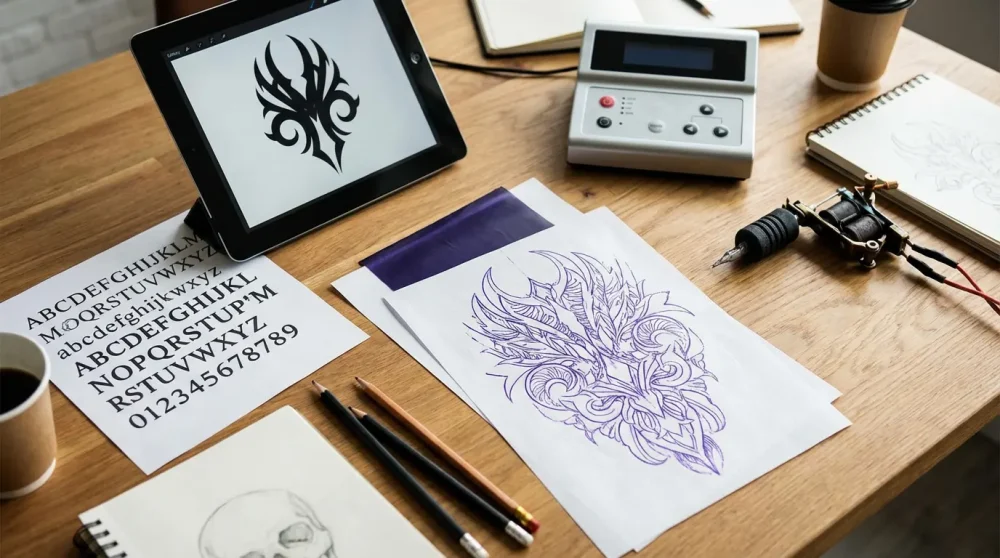
Exporting high-resolution files (Vector vs. Raster)
Once you have designed your perfect ink, the next step is getting it to your artist. The file format matters immensely. A pixelated screenshot from your phone is the worst possible reference. Ideally, you want to provide a vector file (SVG, EPS, or PDF). Vector tattoo lettering is defined by mathematical paths rather than pixels, meaning it can be scaled up to the size of a billboard without losing crispness. This allows the artist to resize the stencil perfectly without jagged edges.
If the generator only outputs images (JPEG or PNG), ensure it is high resolution—at least 300 DPI (dots per inch). If the edges are blurry, the stencil machine will create a messy transfer, forcing the artist to redraw it by hand, which introduces potential for error. Always look for the ‘Export HD’ or ‘Download Vector’ button on your tattoo text creator. It is worth paying a small fee for the high-res file if the free version only offers low-quality downloads.
Why you should bring the font file, not just the image
In addition to the image, it is incredibly helpful to provide the actual font file (.ttf or .otf) if you used a specific typeface. This allows the artist to install the font on their own system. Why is this important? Because they might need to adjust the curve or spacing to fit your body at the appointment. If they only have a flat image (JPEG), they cannot edit the text; they can only stretch the image.
Having the font file gives the artist the flexibility to re-type the phrase if a mistake is found or if you decide to change a word at the last minute. It empowers them to use their professional software (like Photoshop or Procreate) to manipulate the text non-destructively. So, when you download your design from a calligraphy generator, look for the font name and download that file as well.
Allowing artist interpretation: The ‘Artist’s Touch’
While how to design your own tattoo words online is a great query, it comes with a caveat: you are not a tattoo artist. You are a designer. The person holding the machine understands skin. Therefore, you should always present your generated design as a ‘strong reference’ rather than a ‘rigid instruction.’ Allow your artist to suggest modifications. They might thicken a line because they know it will fade, or open up a loop because they know it will bleed.
This collaboration is where the magic happens. The artist might take your generated script and add hand-drawn flourishes or drop shadows that the software couldn’t generate. They adapt the digital perfection of the computer to the organic imperfection of the body. Trusting their expertise ensures that the tattoo not only looks like your design but works as a tattoo. The generator gets you 90% of the way there; the artist takes it the final 10%.
Copyright etiquette: Buying the font license
A common misconception is that all fonts on the internet are free. They are not. Many fonts on sites like DaFont are ‘Free for Personal Use’ but require a license for commercial use. While getting a tattoo is technically personal use for *you* (the wearer), the artist is making money off the application of that design. Furthermore, font designers are artists too. If you are permanently marking your body with their art, it is good karma and proper etiquette to purchase the license, often costing only $10-$30.
This is especially true for unique, hand-crafted scripts found on specialized sites. By buying the license, you support the creator economy. Some tattoo fonts and lettering generator platforms include the license in their premium fee. Always check the ‘Read Me’ file included with font downloads. Respecting copyright ensures that the creative ecosystem thrives and that you aren’t stealing art for your permanent ink.
Printing the reference sheet
Finally, prepare a physical or digital reference sheet. Do not just show up with a phone gallery full of screenshots. Create a clean document that shows the design in a few different sizes, perhaps with a ‘mockup’ on a body part and the clean black-and-white stencil version separate. This shows the artist you are serious and prepared. A tattoo stencil maker tool often has a ‘print sheet’ feature for this exact purpose.
Clear communication minimizes anxiety for both you and the artist. When you hand over a professional packet containing the high-res image, the font file, and the size references, the focus of the appointment shifts immediately to the art and application, rather than administrative fiddling. It sets the tone for a successful, professional session.
Frequently Asked Questions
To convert a generator output into a stencil, you need to create a high-contrast line drawing. If the design is simple black text, it is mostly ready. However, for a perfect thermal transfer, you should convert the image to a vector format using software like Adobe Illustrator or free online vectorizers. This sharpens the edges. Then, the artist prints this digital file onto hectograph paper using a thermal printer to create the purple transfer stencil.
Not always. Many fonts on free repository sites are for ‘Personal Use Only’. If you are a tattoo artist charging for the tattoo, this technically falls under commercial use. It is safest to use platforms like 1001 Fonts with the ‘Commercial Use Allowed’ filter enabled, or to purchase the license for the font. For AI-generated designs, the copyright laws in 2026 are still evolving, but generally, you own the specific output you generated.
Most advanced tattoo text creator tools and design software like Photoshop have ‘text warp’ or ‘path’ features. You draw a curved line that mimics the shape of the body part (e.g., the curve of the collarbone) and snap the text to that line. Mobile apps like the Tattoo Font Designer often feature simplified ‘sliders’ that allow you to bend text into an arc or wave with a single swipe.
Tattoo fonts are pre-made, digital typefaces where every letter ‘a’ looks identical to every other ‘a’. They are rigid and consistent. Custom lettering is drawn specifically for the design, often by hand or via generative AI, allowing for unique variations, ligatures, and flow that fits the body’s muscle structure. Custom lettering is generally considered superior for large or prominent tattoos as it flows better with the body.
Yes, you can turn your handwriting into a font using tools like Calligraphr or specialized handwriting to tattoo converter apps. You simply print out a template, write your alphabet in the boxes, scan it back in, and the software converts it into a .ttf file. This file can then be used by your tattoo artist to type out any phrase in your exact handwriting style, making for a deeply personal tattoo.
To generate custom calligraphy, you should use an AI tattoo designer like Midjourney v7 or specialized tools like InkAI. The key is in the prompt. Use terms like ‘Spencerian script’, ‘flourished calligraphy’, or ‘hand-lettered style’ combined with your specific word. You can also upload a reference image of a style you like and ask the AI to write your specific text in that style. Remember to vectorize the output for the best stencil quality.
In 2026, the leading free tool that offers skin preview functionality is ‘InkPreview AR’ (or similar top-rated apps of the year). These apps leverage the camera to map designs onto your body in real-time. On the web, ‘Tattoon’ has gained popularity for its browser-based ‘Try on’ feature which allows you to upload a photo and overlay generated text. While many advanced features are behind paywalls, these tools offer robust free tiers for basic visualization.