
To outrank competitors, this article combines advanced Midjourney V6 features (like Style References and Personalization) with “copy-paste” professional prompts. It moves beyond basic “imagine a logo” advice into high-level prompt engineering.
Forget generic AI art. The difference between a messy “digital painting” and a professional, scalable logo in Midjourney V6 isn’t magic—it’s math. Specifically, it’s the “secret” combination of parameters, style codes, and negative prompting that most users ignore.
If you want an immediate answer to professional results, start with this Master Formula before we dive deeper:
The “Pro Vector” Formula: /imagine prompt: [SUBJECT] logo, simple vector, flat minimalist design, solid white background, --no realistic details, shading, gradients, photorealistic --style raw --s 50
Ready to build a brand identity that looks like it cost $5,000? Let’s dive into the advanced techniques professional designers are using in 2026.
Best Crypto Tax Software for High Volume Traders 2026: Unlimited Plans & API LimitsThe “Secret Sauce”: Advanced V6 Parameters for Logos
Most tutorials stop at “minimalist logo.” To get truly professional results, you need to control Midjourney’s chaotic creativity. Here are the three “secret” tools for 2026.
1. Style Reference Codes (--sref)
Introduced in late V6 updates, Style References are the game-changer for brand consistency. Instead of describing a style, you give Midjourney a code that forces a specific aesthetic.
- –sref 2372558512: The “Ultra-Minimalist” Code. Forces clean lines and extreme simplicity.
- –sref 1677920710: The “Tech/Architectural” Code. Perfect for geometric and structural logos.
- –sref 1851881805: The “Organic/Boho” Code. Great for wellness and lifestyle brands.
2. The “Raw” Mode (--style raw)
Midjourney V6 has a strong “opinion”—it loves adding lens flares and cinematic lighting. For logos, you want the opposite. Adding --style raw tells the AI, “Stop embellishing and just draw what I asked for.” This is crucial for flat, vector-ready output.
3. Negative Prompts (--no)
What you don’t ask for is as important as what you do. Copy this negative prompt list for every logo generation: --no shading, shadows, photo-realistic, 3d, gradients, complex details, grunge, noise
35+ Professional Logo Prompts (Categorized)
We have categorized these prompts by industry and style. Pro Tip: Replace the bracketed text [Company Name] with your actual text, though we recommend adding typography in Canva or Illustrator for perfect kerning.
Category 1: Minimalist & Geometric (Tech/SaaS)
Best for: Apps, Startups, Crypto, and Software.
Simpsonizados: A Close Look at the Characters of the Simpsons- The “SaaS Unicorn”:
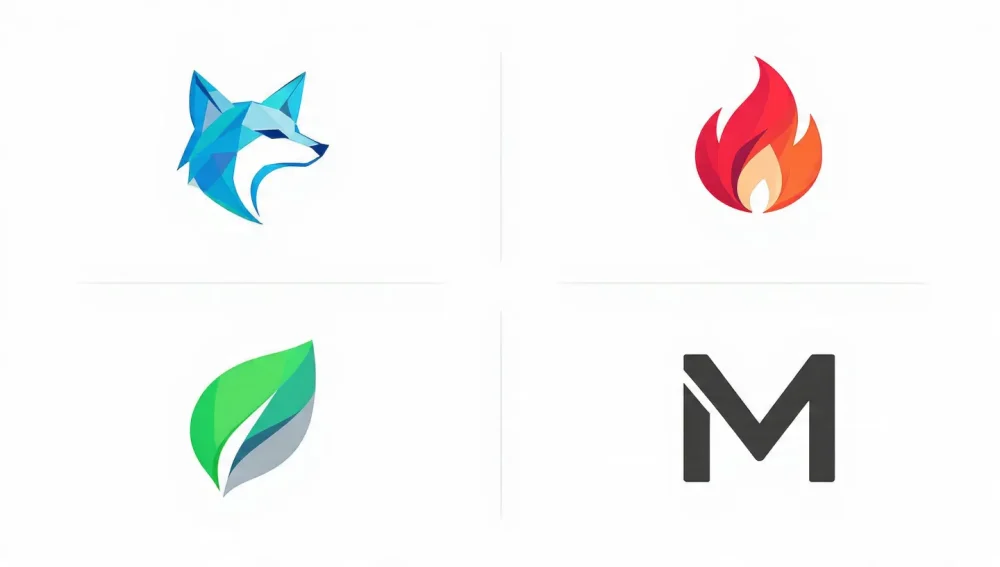
minimalist logo for a tech startup, geometric unicorn head, composed of simple circles and lines, flat vector, royal blue and white, tech aesthetic --style raw --s 50 - Abstract Connectivity:
logo symbol representing "connection", abstract nodes and lines, thick strokes, black on white background, dribbble style --no shading --aspect 1:1 - The Hexagon Letter:
lettermark logo "A", hexagon shape, futuristic font style, flat color, clean vector graphic --style raw --sref 1677920710 - Cyber Security Shield:
simple shield logo, lockhole negative space, cybersecurity concept, cyan and dark grey, flat design --no 3d - Cloud Computing:
cloud logo formed by digital pixels, minimalist, gradient-free, solid colors, highly scalable vector - AI Brain:
stylized brain circuitry logo, simple lines, orange and white, strictly 2D flat design --style raw
Category 2: Modern Badge & Emblem (Coffee/Retail)
Best for: Cafes, Breweries, Barber Shops, and Boutiques.
- The Hipster Coffee:
vintage circular badge logo for a coffee shop, vector line art of a coffee bean, sans-serif typography "BREW", white background --no photorealistic - Artisanal Bakery:
simple line drawing logo of a wheat stalk crossed with a rolling pin, circular border, earthy brown color, minimal aesthetic --s 75 - Craft Brewery:
logo emblem for a craft beer brand, hop cone illustration, bold thick lines, retro vector style, 2 colors only - Barber Shop:
modern crest logo for a barber, scissors and comb crossed, minimal flat vector, navy blue and gold --style raw - Streetwear Brand:
urban graffiti tag style logo, "HYPE", clean vector lines, readable, black ink on white - Florist Emblem:
botanical logo, simple outlined peony flower, circular frame, elegant serif font vibe --sref 1851881805
Category 3: Mascots & Characters (Gaming/Esports)
Best for: Twitch Streamers, Esports Teams, and Youth Brands.
- The Cyber Samurai:
esports mascot logo, cybernetic samurai, glowing visor, bold vector outlines, sticker art style, flat colors --no shading - Angry Bear:
aggressive bear head mascot logo, simple shapes, sports team style, blue and orange, white background --style raw - Cute Kawaii Brand:
kawaii bubble tea character logo, simple face, pastel colors, thick black outline, sticker style - Retro Robot:
vintage toy robot head logo, 1950s style, flat vector, simple geometric shapes, primary colors - Ninja Fox:
ninja fox mascot, dynamic pose, sharp vector shapes, flat illustration, orange and black - Space Explorer:
astronaut helmet logo, minimal vector style, reflection in visor, flat design --s 250
Category 4: Luxury & Lettermarks (Fashion/Real Estate)
Best for: High-end Fashion, Jewelry, and Corporate Firms.
Logotype vs Wordmark: Which is Better for Your Business?- The Monogram:
intertwined letters "L" and "V", luxury fashion logo, serif typeface, elegant, gold color, white background, minimal vector - Real Estate Skyline:
minimalist skyscraper outline logo, gold lines, negative space, premium aesthetic --style raw - Jewelry Diamond:
abstract diamond shape logo, thin geometric lines, elegant, black on white, high contrast - Corporate Eagle:
stylized eagle head logo, profile view, strong geometric shapes, banking industry trust, blue - Perfume Brand:
elegant floral monogram, fine line art, feminine aesthetic, sophisticated, black and white - Law Firm Scales:
modern scales of justice logo, abstract and simplified, navy blue, trustworthy and professional
Category 5: Negative Space & Abstract
Best for: Creative Agencies and Design Firms.
- Hidden Object:
logo featuring a tree, negative space forming a key, clever design, minimal flat vector, green and white - Electric Bolt:
minimalist lightning bolt, using negative space inside a circle, high voltage concept, yellow and black - The Impossible Shape:
penrose triangle logo, optical illusion, flat vector, simple lines, creative agency branding - Animal Silhouette:
cat silhouette logo, negative space eyes, simple shape, sleek, black - Sound Wave:
abstract sound wave logo, circular pattern, minimal bars, music app icon - Water Drop:
pure water drop logo, negative space leaf inside, eco-friendly concept, cyan color
Category 6: Experimental & “Secret” Styles
Using --sref and weird parameters for unique branding.
- Neo-Brutalism:
brutalist design logo, bold typography, stark contrast, anti-design aesthetic --s 0 - Paper Cutout:
layered paper cutout style logo, mountain landscape, simple flat shapes, vector simulation - Bauhaus Style:
Bauhaus style logo, primary geometric shapes, circles and squares, artistic composition --sref 2372558512 - Y2K Aesthetic:
Y2K style logo, futuristic chrome shape, star icon, vector simplified, 2000s tech vibe - Glitch Art:
minimalist glitch logo, distorted letter "X", digital noise, black and white vector
Comparison Table: Midjourney V5.2 vs. V6 for Logos
Understanding why V6 is better helps you save credits.
| Feature | Midjourney V5.2 | Midjourney V6 (2026) | Winner |
|---|---|---|---|
| Text Generation | Gibberish/Alien symbols | Readable (approx. 70% accuracy) | V6 |
| Prompt Adherence | often ignored “simple” requests | Excellent at “flat/vector” instructions | V6 |
| White Background | Struggle (often grey/off-white) | Pure white (easier to remove) | V6 |
| Style References | Not available | --sref codes for consistency | V6 |
| Negative Space | Hit or miss | Understands “negative space” concepts | V6 |
From Pixel to Vector: The Professional Workflow
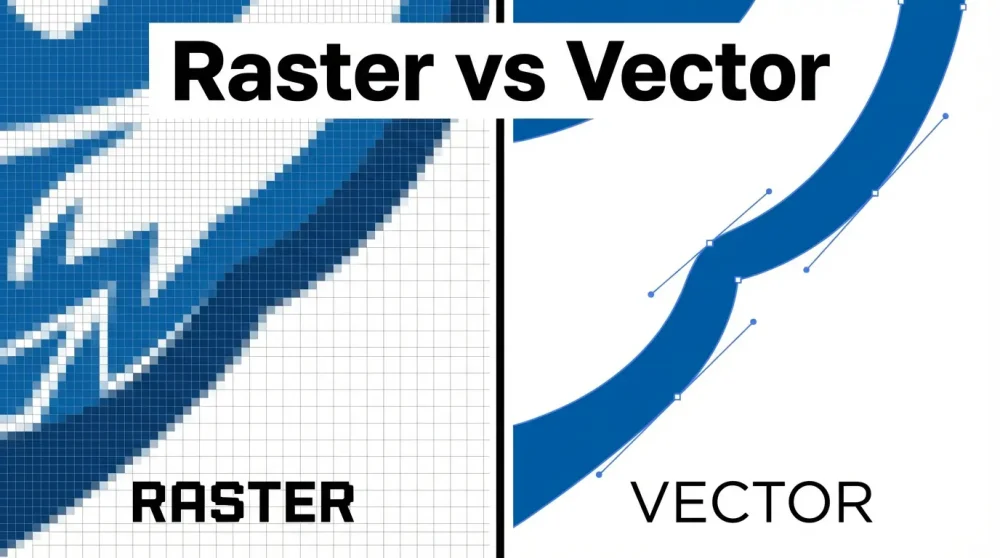
Midjourney generates raster images (pixels, like JPEGs), but professional logos must be vectors (mathematical paths, like SVGs) to scale infinitely without blurring.
The 2026 Workflow:
- Generate your logo in Midjourney using the
--no shadingparameter to ensure flat colors. - Upscale the image using Midjourney’s “Upscale (Subtle)” to smooth out artifacts.
- Vectorize: Use a tool like Vectorizer.ai (AI-powered) or Adobe Illustrator’s Image Trace feature.
- Illustrator Tip: Use the “Black and White Logo” preset in Image Trace for the cleanest results.
- Refine: Open the SVG in Illustrator/Figma/Canva to fix text (always type fresh text!) and adjust colors.
FAQ: Mastering Midjourney Logos
You likely forgot --style raw or didn’t use enough negative prompts. Midjourney’s default is “artistic.” Ensure you use terms like flat vector, 2D, and app icon to force it into a graphic design mode.
In most jurisdictions (including the US), raw AI-generated art cannot be copyrighted. However, if you significantly modify the logo (vectorize it, change colors, combine elements, add unique typography), you may have a stronger claim to the derivative work. Note: Consult a legal professional for business advice.
Midjourney cannot generate transparent PNGs directly. It always generates a rectangular image. This is why adding , solid white background to your prompt is crucial—it makes removing the background in one click (using Photoshop or online tools) much easier.
Yes, but with caveats. V6 is much better at text than V5. Use “double quotes” around your text (e.g., logo saying "NEXUS"). However, for a final professional logo, we always recommend stripping the AI text and adding your own font in Canva or Illustrator for perfect kerning and font choice.
Key Takeaways
- Use Style Codes: Leverage
--srefcodes like2372558512for instant minimalist consistency. - Negative Prompts are Mandatory: Always use
--no realistic, shading, gradientsto ensure clean, vector-ready outputs. - Text is a Draft: Use Midjourney for the icon and layout, but trust professional design software for the typography.
- Vectorize or Die: A raster logo is not a professional logo. Always convert your final selection to SVG.
By mastering these “secret” parameters, you aren’t just prompting—you’re designing. Copy these prompts, tweak them for your brand, and start creating agency-quality work today.