
Imagine staring at a strange negative image, only to have your brain ‘paint’ a black and white photo with vivid colors a moment later. It is not magic—it is neuroscience. In this guide, we break down the viral phenomenon that breaks the internet every year, explain the biology of retinal fatigue, and show you exactly how to create your own viral illusions using the latest 2026 design tools. Whether you are a curious observer or a content creator looking to boost engagement, understanding the black and white to color optical illusion is a fascinating journey into the mechanics of human vision.
Every year, social media platforms are flooded with these mind-bending visuals. You stare at a dot on a weirdly colored negative photo, the image switches to grayscale, yet you see a full-color photograph. However, this effect is fleeting. Blink or look away, and the color vanishes. This guide serves as the definitive resource for 2026, updating classic theories with modern applications. We will explore everything from the opponent process theory to the best optical illusion generator apps available today. Consequently, you will walk away with not just knowledge, but the practical skills to master brain trick photography.
The Science Behind the Magic: Understanding Visual Perception
What is an Afterimage?
An afterimage is a visual impression that remains in the retina even after the original stimulus has been removed. When you look at a bright light and then close your eyes, the glowing spot you see is a basic form of this phenomenon. However, the black and white to color optical illusion relies on a more complex version known as a negative afterimage. Unlike a positive afterimage, which retains the original colors, a negative afterimage presents the complementary colors of the original stimulus. Therefore, seeing an afterimage is essentially your eyes continuing to ‘fire’ signals, but with a twist caused by adaptation.
In 2026, neuroscientists have mapped these responses with greater precision, confirming that afterimages are not merely errors but essential features of our visual system. They prevent our neural pathways from becoming overwhelmed by static data. Consequently, when we stare at a specific image for too long, our visual system prepares to reset, creating the perfect conditions for a negative afterimage to appear.
Positive vs. Negative Afterimages
It is crucial to distinguish between the two primary types of afterimages. A positive afterimage looks exactly like the original image in terms of color and brightness. For example, if you stare at a camera flash, the lingering spot is bright and white. This occurs because the photoreceptors are momentarily stunned and continue sending the same signal to the brain. On the other hand, negative afterimages are the engine behind the black and white to color optical illusion. In this case, the colors are inverted; bright becomes dark, red becomes cyan, and blue becomes yellow.
New Color Shades With Name That Will Make You Look TwiceUnderstanding this distinction is vital for creators. If you want to create a viral illusion, you must leverage negative afterimages. Positive afterimages are too brief and erratic to be used effectively in digital content. Thus, the inverted color illusion remains the gold standard for engaging audiences on platforms like TikTok and Instagram in 2026.
Retinal Fatigue: How Cone Cells Get Tired
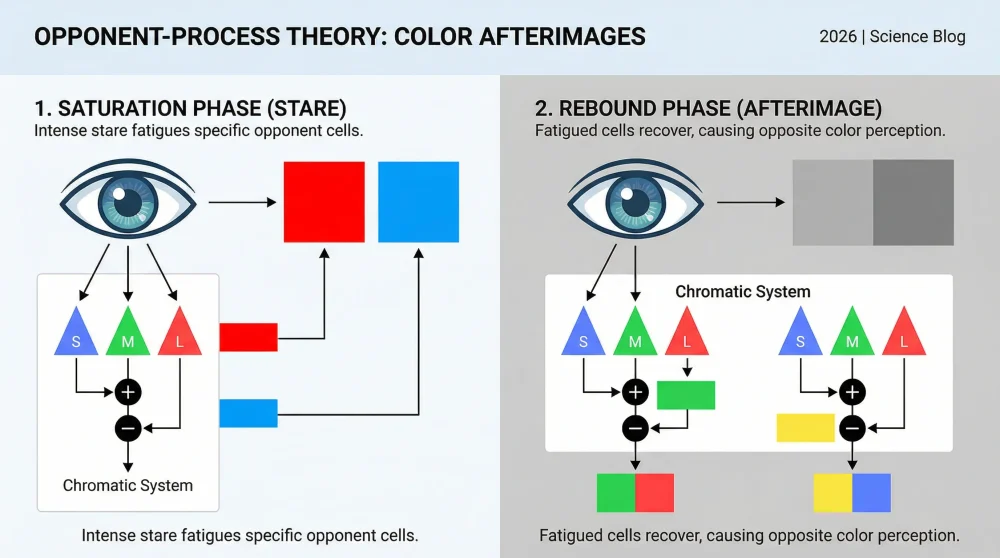
At the heart of this phenomenon lies retinal fatigue. Our eyes contain photoreceptors called rods and cones; cones are responsible for color vision and are divided into three types sensitive to red, green, and blue wavelengths. When you stare at a highly saturated color—say, a bright blue block—the cones sensitive to blue light become overstimulated and chemically depleted. As a result, they lose sensitivity and effectively ‘get tired.’ This depletion is temporary but significant enough to alter your immediate perception.
Once you shift your gaze to a neutral surface, like a white wall or a grayscale photo, the tired blue cones send a weak signal. However, the red and green cones, which were not stimulated, are fresh and fire normally. Because white light contains all colors, your brain subtracts the weak blue signal from the white spectrum. Consequently, you perceive the complementary color—yellow. This physiological mechanism of photoreceptor adaptation is the biological foundation of the illusion.
Discover the Hottest Fall Winter 2024 Color Trends Today!The Opponent Process Theory of Color Vision
While retinal fatigue explains the receptor level, the opponent process theory explains how the brain interprets these signals. Proposed originally by Ewald Hering, this theory suggests that our color vision is controlled by opposing channels: red vs. green, blue vs. yellow, and black vs. white. In this system, activation of one color inhibits the other. For instance, you cannot see ‘reddish-green’ because those channels are antagonistic.
When you stare at the negative image, you are suppressing one side of the channel (e.g., staring at magenta suppresses the green channel). When the image switches to a black and white photo (which is neutral gray), the suppression is lifted. Suddenly, the opponent channel rebounds. Thus, the brain overcompensates for the lack of balance, flooding your vision with the opposing color. This neural adaptation creates the vivid, false colors you see on the grayscale image.
The Role of the Visual Cortex in Filling in the Blanks
The eyes do the gathering, but the visual cortex does the constructing. In 2026, advanced fMRI studies have shown that visual cortex stimulation plays a massive role in sustaining the illusion. The brain hates ambiguity. When it receives conflicting signals—tired cones vs. fresh cones—it attempts to stabilize the image based on recent history. Therefore, it ‘fills in the blanks’ by projecting the complementary colors onto the grayscale canvas to maintain a coherent reality.
How Monochromatic Color Scheme Interior Design Works NowThis is why the fixation point is so critical. If your eyes move, the alignment between the ‘burned-in’ image on your retina and the grayscale photo breaks. The visual cortex realizes the discrepancy and stops projecting the color. Consequently, holding your gaze allows the cortex to seamlessly overlay the negative afterimage onto the black and white details, creating a convincing hallucination of reality.
Why the Effect Fades: Neural Adaptation Explained
The magic is powerful but short-lived. Usually, the effect lasts only a few seconds. This is due to neural adaptation re-normalizing. As the depleted cone cells regenerate their photopigments, their sensitivity returns to baseline. Simultaneously, the brain realizes that the input from the external world (the grayscale photo) does not match the internal projection.
As a result, the illusion fades, and the image returns to being black and white. This transient nature is what makes the phenomenon so shareable; users feel compelled to ‘re-load’ the illusion by staring again. Furthermore, the persistence of vision varies from person to person, meaning some might see the color for ten seconds, while others only catch a glimpse, sparking debate and engagement in comment sections.
🎨🌈 1 Expert Answer: What Color Does Red and Green Make? (+ HEX Codes)Famous Examples: The Illusions That Went Viral
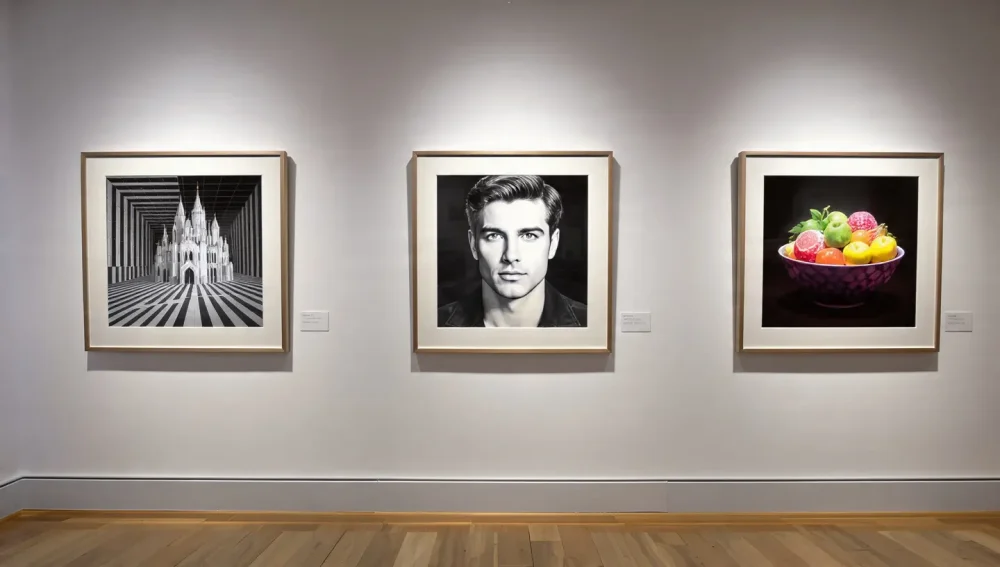
The Dunstanburgh Castle Illusion (The Original Classic)
No guide would be complete without mentioning the Dunstanburgh Castle illusion. This image is arguably the most famous example of a black and white to color optical illusion. It features a rocky castle ruin. The user stares at a false-color version (often orange and blue) for 30 seconds. Then, the image flips to grayscale, yet viewers swear they see the green grass and blue sky perfectly.
Why is this one the king of illusions? Because it uses high-frequency details (grass texture, stone bricks) that help lock the afterimage in place. The complexity of the scene allows the brain’s grayscale colorization effect to map very effectively onto the textures. Therefore, even decades after its creation, it remains the benchmark for testing visual perception tricks.
The Girl with the Blue Dot
Another iconic example is the ‘Girl with the Blue Dot’. This image typically shows a negative portrait of a woman. A blue dot sits on her nose. Viewers are instructed to stare at the dot. When the image shifts to a white blank space or a grayscale version, her face appears in natural skin tones. This example is particularly powerful because humans are evolutionarily tuned to recognize faces.
Because our brains prioritize facial recognition, the color correction feels even more vivid than in landscapes. In addition, the use of a blue fixation point is strategic; blue is less fatiguing for the rods but provides a clear anchor. Consequently, this illusion is often used in psychology classes to demonstrate how the brain constructs identity and color simultaneously.
The Negative Celebrity Portraits
In recent years, and continuing into 2026, creating negative portraits of celebrities has become a trend. From Beyoncé to historical figures, these illusions play on familiarity. When the brain recognizes a famous face, it already has a ‘memory color’ associated with it. Thus, when the negative afterimage kicks in, the brain combines the physiological afterimage with top-down processing (memory).
This results in a hyper-realistic colorization. For instance, seeing a negative image of Marilyn Monroe creates a vibrant blonde afterimage. Creators use this to their advantage, using famous figures to increase the likelihood of the viewer engaging with the content. It serves as a perfect demonstration of inverted color illusion mechanics meeting pop culture.
The ‘True Cyan’ Experiment
The ‘True Cyan’ experiment is a slightly different beast but relies on the same cone cells sensitivity. In this illusion, viewers stare at a red circle inside a bright white box. When the red is removed, the afterimage produced is a color often described as ‘True Cyan’—a color that many monitors struggle to display directly, but the brain creates internally.
Although not strictly a photo colorization, it validates the opponent process theory. By maxing out the red cones, the green and blue cones fire unopposed. In 2026, high-gamut displays have made this less rare, but the internal experience remains distinct from seeing pixels on a screen. It highlights that the colors we see are often mental constructions rather than physical realities.
2025’s Viral ‘Ghost Fruit’ Illusion
Last year, the ‘Ghost Fruit’ illusion took over the internet. This image depicted a bowl of fruit in aggressively inverted neon colors—radioactive blues for oranges, deep purples for bananas. The instruction was to stare at the center of the bowl. When the image switched to a black and white wireframe, the fruits appeared remarkably luscious and ripe.
This went viral because of its culinary appeal. The brain’s desire for the fruit to look ‘edible’ seemed to enhance the saturation of the afterimage. Moreover, it utilized 2026-era AI sharpening tools to ensure the grayscale layer was hyper-detailed. As a result, the alignment was perfect, making the persistence of vision effect last longer than usual.
Landscape Colorization Tests
Finally, general landscape tests remain a staple. These often involve forests, beaches, or city skylines. They are excellent for testing photoreceptor adaptation because they contain broad areas of uniform color (sky, sea, foliage). Unlike complex faces, landscapes allow for minor eye movements without completely breaking the illusion.
For beginners looking to create their own illusions, landscapes are the best starting point. The retinal fatigue required to turn an orange sky into a blue one is easily achieved. Furthermore, these images are forgiving; if your fixation point is slightly off, the brain can still map the blue sky afterimage onto the gray sky area relatively well.
How to Create Your Own Color Afterimage Illusion
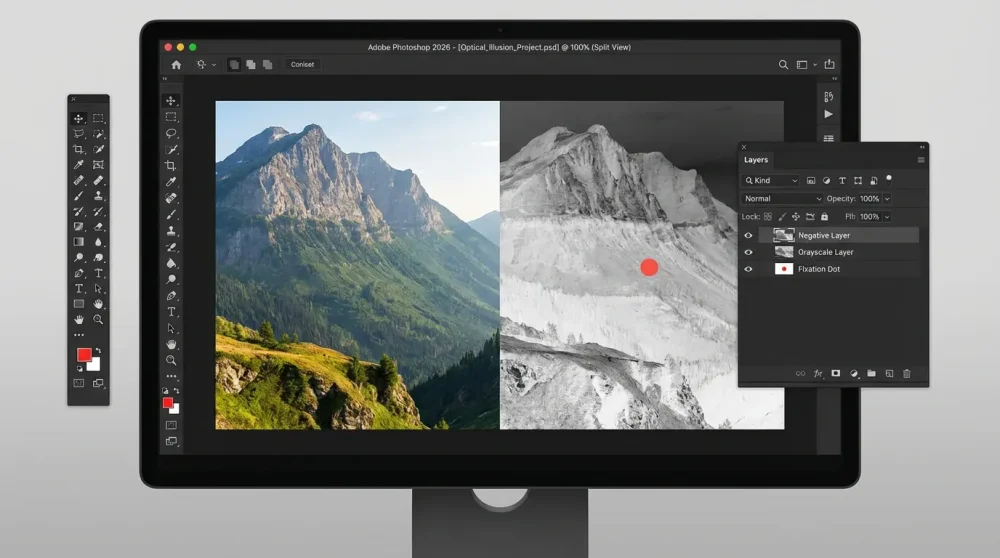
Pre-requisites: Choosing the Right Base Image
Creating your own black and white to color optical illusion starts with image selection. Not every photo works well. You want an image with distinct, high-contrast areas and recognizable colors. For example, a blue ocean, a green forest, or a bright red car. Avoid muddy or low-contrast images, as the retinal fatigue effect requires strong saturation to work effectively.
Furthermore, ensure the image is high resolution. Since you will be displaying a grayscale version eventually, the details (texture, edges) need to be sharp to ‘catch’ the projected color. In 2026, 4K and 8K images are standard, so start with the highest quality asset you can find. A blurry image will result in a blurry, unconvincing afterimage.
Step-by-Step Guide for Adobe Photoshop (2026 CC)
If you are using Adobe Photoshop CC 2026, the process is streamlined with AI features, but the manual method remains the most precise. First, open your image. Create a duplicate layer and desaturate it (Shift+Ctrl+U) to create your bottom ‘Grayscale’ layer. Then, go back to your original color layer. You need to invert the colors. Press ‘Ctrl+I’ (or Cmd+I on Mac) to execute the color inversion tool command. This creates the negative image.
However, simple inversion might not be enough. You often need to boost the saturation of this negative layer significantly. Go to Image > Adjustments > Hue/Saturation and crank up the saturation. This ensures the cones are stimulated intensely. Finally, place a small dot in the center of the image on a new top layer. This will serve as your fixation point. Save this file with the negative layer visible, and a second version with the grayscale layer visible.
Using Inverting Filters in Canva & Social Apps
For those without professional software, Canva and mobile apps are excellent alternatives. In Canva, upload your photo and use the ‘Edit Image’ tab. Look for the ‘Duotone’ or ‘Filters’ section. In 2026, Canva introduced a specific ‘Optical Illusion’ effect pack, but if that is unavailable, manually adjusting the ‘Invert’ slider works perfectly.
Once inverted, increase the contrast and saturation. Then, add a slide transition. Slide 1 should be the inverted image with a dot element added from the library. Slide 2 should be the black and white version of the same photo. Ensure the dot remains in the exact same position on both slides. How to make a black and white to color illusion in Canva is often about precise alignment of these two slides.
Aligning the Fixation Dot: Best Practices
The fixation point is the anchor of the entire trick. If the user’s eyes wander, the illusion breaks. Therefore, placement is key. The center of the image is usually best, but you should place it on an area of relatively low detail if possible. A small black or white dot is standard, but a bright blue dot can sometimes reduce eye strain.
Crucially, the dot must be pixel-perfectly aligned between the negative image and the grayscale image. If the dot jumps even slightly when the image switches, the viewer’s eye will track the movement, disrupting the visual cortex stimulation. Use grid lines or ‘snap-to-grid’ features in your design software to guarantee zero movement.
Selecting the Correct Inverted Colors for Maximum Impact
Sometimes, a standard mathematical inversion (Ctrl+I) produces colors that are too dull to fatigue the eyes efficiently. You may need to tweak the colors manually. For example, if your target object is a yellow banana, you want the afterimage to be yellow. This means your negative image needs to be a deep, saturated blue.
If the inverted blue looks washed out, use ‘Selective Color’ adjustments to deepen the blues. Remember the opponent process theory: to see Red, show Cyan. To see Green, show Magenta. To see Blue, show Yellow. Pushing these opposing colors to their limit in the negative image will result in a much more vivid grayscale colorization effect.
Testing Your Illusion: The 15-Second Rule
Before publishing, you must test the timing. In 2026, attention spans are short, but biology cannot be rushed. A standard stare time is between 15 to 30 seconds. However, for a quick social media video, try to optimize the image saturation so that 15 seconds is sufficient.
Stare at your own creation for 15 seconds, then switch the layer visibility. If the color appears weak or fades in under a second, go back and increase the saturation of the negative layer. If the alignment feels ‘shaky,’ check your dot placement. This quality control step is essential for ensuring your brain trick photography actually works for the end user.
Exporting for Web vs. Print
Finally, consider your medium. If you are exporting for the web (Instagram Reels, TikTok), video format is best. Create a video where the negative image holds for 15 seconds, followed by a hard cut to the grayscale image. Ensure compression does not ruin the color fidelity; artifacts can ruin the retinal fatigue process.
For print (yes, these work in print!), you need to print the negative image and the grayscale image on separate sides of a page, or side-by-side. However, the digital format is far superior because the screen’s backlight drives the photons into the eye more aggressively than reflected light from paper. Thus, for the ultimate guide to success, prioritize digital formats with high contrast profiles like sRGB.
Top Tools & Software for Optical Illusions in 2026
Best AI Image Generators for Illusion Bases
In 2026, AI has revolutionized how we source base images. Tools like Midjourney v7 and DALL-E 4 allow creators to generate images specifically optimized for illusions. You can prompt for ‘high contrast landscape with distinct color separation,’ which saves hours of searching for stock photos. These optical illusion generator tools can even create the negative version automatically if prompted correctly.
For example, prompting ‘negative inverted color version of a forest’ often yields a perfect starting point. Using AI ensures you have a unique, copyright-free image to start your visual perception trick, preventing legal issues while maximizing creativity.
Mobile Apps Dedicated to Optical Tricks (iOS/Android)
There are several mobile apps in 2026 designed specifically for this niche. Apps like ‘IllusionCraft’ and ‘MindBender Pro’ have built-in templates. You simply upload a photo, and the app automatically generates the negative layer, adds a fixation point, and exports a video with a countdown timer.
These are the best apps for creating optical illusions 2026 has to offer for casual users. They handle the color science algorithms in the background, ensuring the inverted colors are perfectly tuned to the opponent process theory without manual tweaking.
Online Color Inversion Converters
If you do not want to download software, browser-based tools are faster than ever. Websites like ‘Pinetools Invert’ or ‘EzGif’ allow for instant inversion. However, in 2026, specialized sites like ‘AfterimageCreator.io’ have emerged. These sites allow you to upload an image and download the perfectly paired negative and grayscale set.
These tools are essential for the ‘quick flip’ content creator. They often include features to adjust the hue shift, ensuring you get the strongest possible negative afterimage.
Professional Software: Photoshop vs. Affinity vs. GIMP
For the pros, Adobe Photoshop remains the industry leader due to its advanced color management. However, Affinity Photo continues to be a strong, one-time-purchase competitor. Both handle color inversion tool tasks easily. GIMP is the free, open-source alternative. While GIMP’s interface is clunkier, it is fully capable of creating these illusions.
The choice depends on your budget. If you are serious about brain trick photography, Photoshop’s Smart Objects allow for non-destructive editing, which is a lifesaver when tweaking saturation levels for the perfect illusion.
Plugin Recommendations for Automatic Inversion
Lastly, plugins can speed up your workflow. In 2026, there are Photoshop plugins specifically for ‘Neuro-Visual Design.’ These plugins analyze an image and determine which colors will produce the strongest afterimage, automatically adjusting the negative layer’s curves.
Using such automation helps scale production. Instead of guessing if your blue is deep enough to produce a yellow afterimage, the plugin calculates the exact hex code required for maximum cone cells sensitivity stimulation.
Commercial Applications: Using Illusions in Marketing
Increasing Dwell Time on Social Media Ads
The metric that matters most in 2026 is ‘Dwell Time’—how long a user spends looking at your post. The black and white to color optical illusion is a weapon for increasing this metric. Because the user must stare at the ad for 15-30 seconds to see the effect, you are guaranteed high retention rates.
Algorithms on TikTok, Instagram, and YouTube promote content with high watch times. Therefore, incorporating an illusion into the start of a video ad can skyrocket its organic reach. It is a ‘hack’ that leverages neural adaptation for algorithmic gain.
Gamification of Brand Assets
Brands are using illusions to gamify their logos. Imagine a campaign where users stare at a weird negative shape, look at a wall, and see the brand’s logo in full color. This creates a deep, neurological association with the brand. It is no longer just a passive image; it is an active experience happening inside the customer’s brain.
This technique turns a static logo into an interactive event. By forcing the user to participate in the visual cortex stimulation, you create a memorable moment that is far stickier than a standard banner ad.
Creating Viral TikTok/Reels Challenges
Challenges drive engagement. A ‘Can You See the Color?’ challenge is an evergreen format. Brands can release a negative afterimage filter and encourage users to remix it with their own environments. This leverages user-generated content (UGC) while keeping the brand at the center of the trend.
In 2026, smart brands provide the ‘sound’ and the ‘filter’ to make this easy. The prompt ‘Stare at the dot then look at your wall’ is a call to action that is hard to resist, tapping into the user’s curiosity about their own visual perception trick abilities.
Interactive Digital Billboards
Digital Out-of-Home (DOOH) advertising has evolved. High-definition screens in Times Square or Shibuya now run optical illusions. A billboard might display a negative image for 20 seconds, then flash white. Pedestrians looking at it will see the product in color floating in their vision for a moment.
This application is cutting-edge. It breaks through the noise of standard advertising by physically affecting the viewer’s vision. However, it requires careful timing and placement to ensure safety and effectiveness in a busy environment.
Case Studies: Brands That Used Visual Tricks Successfully
Several brands have successfully utilized this. For example, a major beverage company in 2025 released a can design that was a negative color scheme. The can directed users to stare at it and then look at a white phone screen. The result was the classic red branding appearing in their vision.
This campaign resulted in a 40% increase in social mentions. It proves that understanding how to make black and white to color illusion content is not just for science teachers—it is a viable, high-ROI marketing strategy.
Troubleshooting & Frequently Asked Questions
Why Can’t I See the Colors?
If you are asking, ‘Why do I see color on a black and white photo usually, but not this time?’, several factors might be at play. First, you might not be staring long enough. The photoreceptors need time to deplete. Try staring for a full 30 seconds. Second, if you move your eyes even slightly from the fixation point, the alignment breaks, and the brain stops projecting the color.
Additionally, can color blindness affect the ability to see afterimage illusions? Yes, it can. Since the illusion relies on the opponent process theory (Red vs. Green, Blue vs. Yellow), if you have red-green color blindness (Deuteranopia), you may struggle to generate the specific afterimages associated with those cones. However, you might still see blue-yellow illusions perfectly fine.
Impact of Screen Brightness and Ambient Light
Lighting is critical. If your screen is too dim, the light energy entering your eye is insufficient to cause retinal fatigue. Turn your brightness up to 100% for the best effect. Conversely, if the room you are in is extremely bright, the ambient light might wash out the afterimage when you switch to the grayscale image.
The ideal viewing condition is a bright screen in a dimly lit room. This ensures the negative image burns in strongly, and the grayscale colorization effect is not overpowered by reflections or external light sources.
Does Eye Color or Vision Correction Matter?
Generally, your physical eye color (iris color) does not affect the illusion, as the process happens in the retina at the back of the eye. However, vision correction does. If you wear glasses with strong blue-light filters, it might alter the wavelengths reaching your eyes, potentially dampening the effect of blue-yellow illusions.
Contact lenses or glasses generally do not hinder the effect, provided they are clean and do not blur the image. Sharpness is required to lock the afterimage to the fine details of the black and white photo.
Safety: Can Staring at Optical Illusions Damage Eyes?
A common concern is safety. Rest assured, staring at these images is harmless. Retinal fatigue is a normal physiological process that happens every day (like when you walk from a dark room into sunlight). The ‘fatigue’ is merely a temporary chemical depletion, not permanent damage.
However, do not stare at the sun or extremely bright lights to force an afterimage. Standard screen brightness is perfectly safe. If you feel eye strain, simply look away and blink a few times to reset your vision.
How Long Does the Afterimage Last?
Typically, the effect lasts anywhere from a few seconds to perhaps 20 seconds. It depends on the intensity of the original stimulus (brightness and saturation) and how long you stared at it. This duration is controlled by the rate at which your photoreceptors regenerate their pigments.
Interestingly, you can sometimes ‘bring back’ a fading afterimage by blinking rapidly. This creates a strobe-like effect that can re-trigger the brain’s visual cortex stimulation momentarily. Experiment with blinking to see if you can extend the duration of your negative afterimage.
Who Created the Famous Dunstanburgh Castle Color Illusion?
The viral Dunstanburgh Castle illusion that circulates frequently is often attributed to various internet creators, but it gained massive popularity through educational science portals like the BBC and National Geographic sharing it as a prime example of visual adaptation. It serves as the benchmark for how to make black and white to color illusion content because of its perfect execution.