OpenUSD has evolved from a 3D file format into the backbone of the modern remote video pipeline. It allows 3D artists, compositors, and editors to work on the same scene simultaneously, regardless of their location or software.
In 2026, OpenUSD isn’t just for Hollywood blockbusters; it is the standard for any distributed team dealing with VFX, virtual production, or complex motion graphics. This guide will walk you through the essential tools, workflows, and strategies to build a bulletproof OpenUSD pipeline for your remote team.
Why OpenUSD Changes Everything for Remote Teams
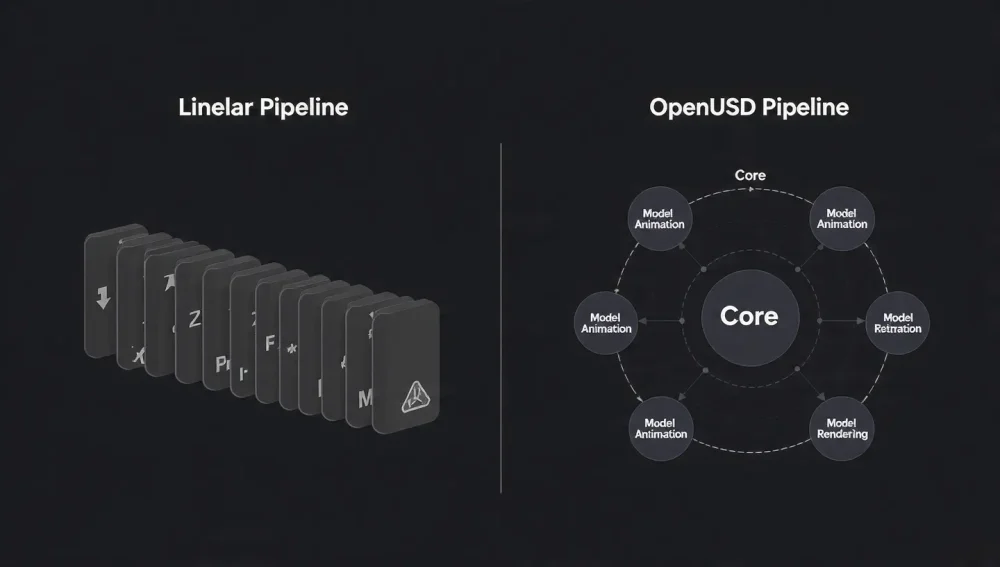
Before diving into the tools, it is critical to understand why this shift is happening. Traditional pipelines are linear: the modeler passes a file to the animator, who passes it to the lighter, who renders it for the editor. If the director changes a prop, the entire chain breaks.
OpenUSD creates a non-destructive, parallel pipeline.
- Layering: An animator can work on a character layer while a lighter adjusts the environment layer in the same file.
- Composition Arcs: Teams can “reference” assets without copying them, keeping files lightweight for remote transfer.
- Single Source of Truth: No more version conflicts. Everyone references the master USD stage.
Top OpenUSD Platforms for Real-Time Collaboration
The “Metaverse” hype may have settled, but the tools it spawned are now industrial-grade workhorses for video production.
5 Best TikTok Video Editing Tools for Beginners (2026 Guide)1. NVIDIA Omniverse: The collaborative Hub
Best For: Real-time synchronization and “Google Docs-style” 3D editing.
NVIDIA Omniverse is currently the gold standard for OpenUSD collaboration. Its core technology, Nucleus, acts as a server that manages your USD assets.
- Live Sync: A remote artist in London can move a virtual light in Maya, and the director in New York sees the change instantly in the Omniverse view.
- Review: Tools like Omniverse Cloud allow non-technical team members to review high-fidelity 3D scenes in a web browser without needing a powerful GPU.
- USD Composer: This application lets you assemble scenes from disparate sources (e.g., a car from Alias, a building from Revit, and characters from Blender) into a single USD stage.
2. SideFX Houdini (Solaris): The Heavy Lifter
Best For: Layout, lighting, and assembling massive scenes.
5 ‘Zero-Shot’ Video Editors That Make Premiere Pro Look Like a TypewriterHoudini’s Solaris context is built natively on USD. For remote teams, this is where the “heavy lifting” happens.
- LOPs (Lighting Operators): These nodes manipulate USD data directly. You can create a “shot” that references the master assets but contains unique lighting and camera moves.
- Efficient Handoffs: Instead of sending gigabytes of baked geometry, a Houdini artist sends a tiny USD text file containing only the changes (overrides) to the next department.
3. Autodesk Maya & 3ds Max: The Standard Bearers
Best For: Asset creation and animation.
Autodesk has aggressively integrated OpenUSD. The Maya USD plugin allows artists to load gigabytes of USD data almost instantly as “proxy” shapes.
Best Freeware MP3 Converter 2026: Top AI-Powered Tools Reviewed- Hybrid Workflow: An animator can see the high-res set via USD (streamed from the cloud) while animating their character locally in Maya.
- Bifrost USD: Allows for procedural set dressing that saves directly to USD layers, keeping the main file clean.
OpenUSD in Compositing & Video Editing
For video teams, the bridge between 3D and 2D is where the magic happens. 2025/2026 has seen massive leaps in NLE (Non-Linear Editor) and compositor support for USD.
Foundry Nuke (15.1+)
Nuke is the leader in USD compositing. Its 3D System has been rewritten to support USD natively.
- GeoMerge Node: Allows compositors to merge separate USD layers (e.g., “Background,” “FX,” “Char”) inside Nuke without going back to 3D.
- Scene Graph Popup: A remote compositor can inspect the USD file hierarchy to turn off specific objects that are blocking the camera, saving a round-trip to the 3D department.
- Why it matters: A compositor can light and render the 3D scene inside Nuke using the USD data, allowing for last-minute changes to reflections or shadows without a re-render from the 3D team.
Blackmagic Fusion (DaVinci Resolve 19)
Fusion has introduced a suite of “u” tools (uLoader, uMerge, uRenderer) to handle USD files.
Best Auto Subtitle Generators for YouTube Creators: 10 Proven Tools for 2025- Volumetric Support (uVolume): Import VDB clouds or fire via USD containers.
- Workflow: Editors in DaVinci Resolve can drag a USD asset into a Fusion clip, add a light, and composite it over video footage.
- Pro Tip: As of 2026, Fusion’s USD tools are powerful but can be prone to crashes with extremely complex scenes. It is best used for motion graphics and lighter 3D elements rather than full CGI environments.
Adobe After Effects & Premiere Pro
Adobe’s approach is more consumer-friendly but less “native.”
- GLB/GLTF Import: Under the hood, Adobe uses USD technology to process 3D models, but the workflow is often wrapped in simpler formats like GLB.
- Current State: Great for motion designers adding 3D logos or products, but lacks the deep “Layering” and “Variant” controls found in Nuke or Fusion.
| Feature | Nuke 15.1+ | Fusion 19 | After Effects (Beta/2026) |
|---|---|---|---|
| Native USD Import | ✅ Full Support | ✅ Full Support | ⚠️ Limited (via GLB/OBJ) |
| Scene Graph Editing | ✅ Advanced | ✅ Moderate | ❌ Basic |
| Lighting/Shading | ✅ Full Hydra Support | ✅ Storm/Karma Support | ⚠️ Basic |
| Learning Curve | 🔴 Steep | 🟡 Medium | 🟢 Low |
The “Virtual Dailies” Workflow for Remote Teams
How does this look in practice? Here is a battle-tested workflow for a distributed team.
- Asset Creation (Remote Artists): Modeler in Brazil pushes a
Chair.usdasset to the team’s cloud storage (Dropbox/S3/Nucleus). - Scene Assembly (Supervisor): Supervisor in LA opens the
Master_Scene.usdand references the Chair. They don’t import it; they just point to it. - Layout & Animation: Animators create a
Shot_01.usdlayer that moves the Chair. This file is only a few kilobytes. - Review (Director): The Director opens a web link (Omniverse Cloud). They see the animated chair in the scene. They leave a comment: “Make it red.”
- The Fix: The Supervisor creates a new
Lookdev_Overlay.usdlayer, changes the material to red, and saves. - Instant Update: The director refreshes their browser. The chair is red. The Compositor in Nuke reloads their script. The chair is red. No files were re-exported or re-uploaded.
Asset Management & The Cloud
You cannot simply email USD files; they rely on specific folder structures. You need a DAM (Digital Asset Manager) or a smart file system.
Autodesk Flow Production Tracking (ShotGrid)
Formerly ShotGrid, Flow now registers USD publishes. It doesn’t “edit” the USD, but it tracks the versions. It is essential to know which USD file is the approved “hero” asset.
LucidLink
For remote teams, LucidLink is a game-changer. It streams files on-demand.
- Why it works with USD: USD files often reference hundreds of textures. LucidLink lets your OS “see” them all instantly without downloading terabytes of data. Your USD stage loads immediately, pulling only the bits of data required for the current camera view.
2026 Trends: Generative AI & NIMs
The frontier of OpenUSD is Generative AI.
- NVIDIA NIMs: These are microservices that can generate OpenUSD code or assets. A remote artist can type “Add a fog layer at ground level” into a chat window in their USD app, and an AI agent will generate the Python code to insert that USD prim into the stage.
- Text-to-3D: We are seeing tools that generate USD-compliant geometry and PBR materials from text prompts, automatically placing them into the correct layer hierarchy.
FAQ: OpenUSD for Remote Teams
Q: Do I need to convert all my existing FBX/OBJ files to USD?
A: Eventually, yes. However, many apps (like Omniverse) allow you to reference an FBX file, and the software wraps it in a USD container on the fly. For long-term efficiency, converting your library to .usdz or .usdc is recommended.
Q: Is OpenUSD the same as USDZ?
A: Not exactly. OpenUSD is the full framework and ecosystem. .usdz is a specific file format (a zipped archive) used primarily by Apple for AR on iPhones. It is a valid USD file, but for production pipelines, you will mostly use .usd (ascii) or .usdc (binary crate) files.
Q: Can I use OpenUSD with a slow internet connection?
A: Yes, if you use a referencing workflow. Because you are often only exchanging small text files (layers/overrides) that point to heavy assets already on a server, the daily transfer load is much lower than sending full project files.
Q: Why does my USD scene look different in Maya vs. Nuke?
A: This is usually a “Render Delegate” issue. USD describes the data, but the renderer (Arnold, V-Ray, Karma, Storm) draws it. To get 1:1 parity, ensure both apps are using the same render delegate (e.g., Hydra Storm for preview, or Arnold for final).
Q: Is there a “Google Docs” for 3D?
A: NVIDIA Omniverse Cloud is currently the closest equivalent. It allows multiple users to view and manipulate a stage simultaneously in real-time.