Website security is a major concern for WordPress users. To protect your data, reputation, and visitors, it’s crucial to keep your WordPress site secure. One effective method is to use the wp-config.php file, an important configuration file on WordPress. This blog post will explore various strategies and options for enhancing your WordPress site’s security with the wp-config.php file.
One great way to boost your WordPress site’s security is by using the wp-config.php file, which is a crucial configuration file in the WordPress system. This blog post will dive into different strategies and options to strengthen your WordPress site’s security using the wp-config.php file.
Key Takeaways
- wp-config.php File: Critical for managing WordPress settings and enhancing security.
- Database Security: Protect database credentials to prevent data loss and unauthorized access.
- Authentication Keys/Salts: Use unique keys to encrypt sensitive data and prevent session hijacking.
- Debug Mode: Enable safely to avoid exposing sensitive information during troubleshooting.
- File Permissions: Set correct permissions to limit unauthorized access to sensitive files.
- Preventing Script Injections: Implement measures in wp-config.php to protect against malicious code injections.
- Limit Login Attempts: Strategies to prevent brute force attacks on user accounts.
- Content Security Policy (CSP): Implement CSP to control resources and mitigate cross-site scripting attacks.
- Regular Backups: Automate backups for data protection against loss.
- Additional Security Measures: Use HTTPS, keep software updated, utilize security plugins, enforce strong passwords, and implement two-factor authentication.
What is wp-config.php?
The wp-config.php file is a critical configuration file on WordPress. It provides essential settings that help manage your WordPress installation effectively. This file is located in the root directory of your WordPress site and is among the first files that WordPress loads when users access your website. Understanding its significance is crucial for enhancing the security of your WordPress site. Proper management of this file can prevent unauthorized access and safeguard sensitive information.
How Does wp-config.php Enhance Security?
The wp-config.php file includes various settings that can significantly bolster your site’s security. By properly configuring this file, you can mitigate risks related to unauthorized access, data breaches, and other cyber threats. For instance, settings in wp-config.php can help control database access, secure user sessions, and manage debugging information. Leveraging these settings is a foundational step in securing your WordPress site, making it an essential part of your site’s overall security strategy.
How Can You Secure Your Database Connection?
Why is Database Connection Security Crucial?
Database connection security is vital because the database stores all content, user information, and essential data for your WordPress site. If compromised, attackers can gain access to sensitive information and potentially damage your site. Compromised database credentials can lead to severe consequences, including data loss, data theft, and unauthorized changes to your website. Therefore, safeguarding these credentials is of utmost importance.
How WordPress Pre-Built Websites Will Help You Design for Tech ClientsSteps to Define Secure Database Connection Constants
To secure your database connection, define secure constants in the wp-config.php file:
// ** MySQL settings - You can get this info from your web host ** //
/** The name of the database for WordPress */

Example of DB_NAME: define('DB_NAME', 'your_database_name');

Example of DB_USER: define('DB_USER', 'your_database_username');

Example of DB_PASSWORD: define('DB_PASSWORD', 'your_secure_database_password');

Example of DB_HOST: define('DB_HOST', 'localhost');
Using unique and complex credentials significantly reduces the risk of unauthorized access to your database. Furthermore, it’s advisable to restrict database user permissions to only what is necessary for the website’s functionality.
Why Are Authentication Keys and Salts Important for Security?
Definition and Purpose of Authentication Keys and Salts
Authentication keys and salts are random strings used by WordPress to encrypt user sessions, passwords, and sensitive data. These keys enhance the security of stored information by ensuring that even if someone gains access to the database, they cannot easily decipher sensitive information.
WordPress Hacks: Make Your Blog More SEO FriendlyRisks of Not Using Unique Keys
Failing to use unique authentication keys can make your site vulnerable to session hijacking and other security threats. Without unique keys, an attacker could exploit user sessions and gain unauthorized access to accounts. This could lead to data breaches, loss of user trust, and potential legal ramifications.
How to Implement Authentication Keys and Salts
You can generate unique keys using the WordPress secret key generator. Once generated, add them to your wp-config.php file like this:
define('AUTH_KEY',         'your_unique_authentication_key');
define('SECURE_AUTH_KEY',  'your_unique_secure_authentication_key');
define('LOGGED_IN_KEY',    'your_unique_logged_in_key');
define('NONCE_KEY',        'your_unique_nonce_key');
define('AUTH_SALT',        'your_unique_authentication_salt');
define('SECURE_AUTH_SALT', 'your_unique_secure_authentication_salt');
define('LOGGED_IN_SALT',   'your_unique_logged_in_lkey');
define('NONCE_SALT',       'your_unique_nonce_salt');
Implementing these keys can significantly enhance the security of your WordPress site by providing an extra layer of encryption for sensitive user data.
10 Best Hotel Reservation WordPress ThemesHow Can You Enable Debug Mode Safely?
Risks Associated with Debug Mode
While debugging is essential for troubleshooting, enabling debug mode without precautions can expose sensitive information to potential attackers. For example, error messages might reveal database connection details or file paths that could be exploited.
Steps to Enable Debug Mode Safely
To enable debug mode safely, you can add the following lines to your wp-config.php file:
define('WP_DEBUG', false);
define('WP_DEBUG_LOG', false);
define('WP_DEBUG_DISPLAY', false);
If you need to enable debug mode temporarily for troubleshooting, set it as follows:
20 Greatest Flat WordPress Themesdefine('WP_DEBUG', true);
define('WP_DEBUG_LOG', true);
define('WP_DEBUG_DISPLAY', false);This configuration allows debug information to be logged without displaying it on the front end, mitigating risks of exposing sensitive information. Additionally, it’s wise to disable debug mode as soon as troubleshooting is completed.
How Can File Permissions Enhance Security on a Server?
Importance of Setting Correct File Permissions
Improper file permissions can lead to vulnerabilities like unauthorized access and modifications. Setting correct permissions is essential for maintaining a secure environment. For instance, if permissions are too permissive, unauthorized users may gain access to sensitive files or make modifications that could compromise site integrity.
Recommended Permission Settings
You can set recommended permissions for your WordPress installation using the following constants:
define('FS_CHMOD_DIR', 0755);
define('FS_CHMOD_FILE', 0644);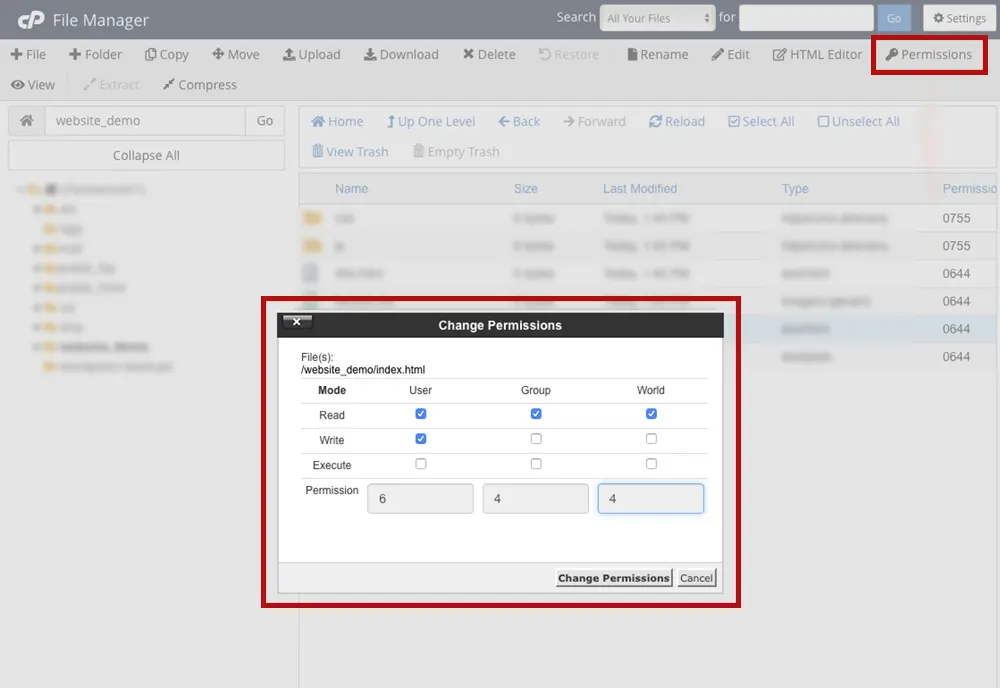
These settings ensure that your files and directories are accessible only to authorized users, reducing the risk of unauthorized modifications.
How Can You Prevent Script Injections in Your WordPress Site?
What Are Script Injections?
Script injections occur when attackers inject malicious code into your website. This can lead to issues like data theft, website defacement, and unauthorized control over your site.
Measures to Prevent Script Injections
To prevent script injections, you can implement the following measures in the wp-config.php file:
define('DISALLOW_FILE_EDIT', true);
define('DISALLOW_FILE_MODS', true);
Using these constants prevents users from editing theme and plugin files through the WordPress admin dashboard, reducing the risk of unauthorized code changes. Additionally, consider regularly reviewing and updating installed plugins and themes to minimize vulnerabilities.
What Steps Can Be Taken to Limit Login Attempts to Prevent Brute Force Attacks?
Definition of Brute Force Attacks
Brute force attacks involve attackers repeatedly trying different username and password combinations to gain unauthorized access. These attacks can be automated, making them a serious threat to WordPress sites.
Strategies to Limit Login Attempts
You can mitigate brute force attacks by implementing the following measures in wp-config.php:
define('FORCE_SSL_ADMIN', true);
define('LIMIT_LOGIN_ATTEMPTS', 5);
define('DISALLOW_MULTIPLE_CONCURRENT_LOGINS', true);
These settings ensure that the admin area is only accessible via HTTPS and limit the number of login attempts. Limiting login attempts makes it significantly harder for attackers to gain access through brute force methods.
How Can You Enable Content Security Policy (CSP) on WordPress?
What is Content Security Policy?
Content Security Policy (CSP) is a security measure that helps prevent attacks like cross-site scripting (XSS) by controlling which resources a browser can load. Implementing CSP adds a layer of protection by specifying trusted sources for content.
Steps to Implement CSP in wp-config.php
You can implement CSP by adding the following code to your wp-config.php file:
header("Content-Security-Policy: default-src 'self'; script-src 'self'
'unsafe-inline' 'unsafe-eval'; style-src 'self' 'unsafe-inline'; img-src
'self' data:; font-src 'self'; connect-src 'self'");
This configuration specifies that resources should only be loaded from trusted sources, reducing the risk of executing malicious scripts. Adjust CSP directives based on specific needs while maintaining security standards.
What Methods Can Be Used to Automate Regular Backups?
Importance of Regular Backups for Security
Regular backups are vital for protecting your website against data loss due to cyberattacks or technical failures. Without an up-to-date backup, restoring your site after an attack or failure becomes significantly more challenging.
Automating Backups in wp-config.php
You can automate backups by adding these lines to your wp-config.php file:
define('WP_CRON_BACKUP_SCHEDULE', 'daily');
define('WP_CRON_BACKUP_RETENTION', 7);
These constants set up a daily backup schedule while retaining the last seven backup files, ensuring you have recent copies available if needed. Additionally, consider storing backups securely offsite or using a reliable backup plugin for more comprehensive solutions.
Additional Security Measures to Consider
- Using HTTPS: Ensure that your site uses HTTPS for secure data transmission. This protects user data during transmission.
- Regular Updates: Keep your WordPress core, plugins, and themes updated to protect against vulnerabilities. Regular updates often include security patches.
- Security Plugins: Consider utilizing security plugins for enhanced protection against various threats. Plugins can provide features like firewall protection, malware scanning, and login monitoring.
- Strong Password Policies: Enforce strong password policies for user accounts to reduce the likelihood of unauthorized access.
- Two-Factor Authentication (2FA): Implement two-factor authentication for an added layer of security during login attempts.
- Limit User Permissions: Apply the principle of least privilege by limiting user roles and permissions based on their needs.
Conclusion
Securing your WordPress site using wp-config.php is crucial for maintaining its integrity and protecting sensitive data. By implementing the outlined measures such as securing database connections, using authentication keys, enabling safe debug mode, setting appropriate file permissions, preventing script injections, limiting login attempts, implementing CSP, automating backups, and considering additional security measures you can significantly enhance your site’s security. Ongoing vigilance and regular updates will further ensure that your WordPress installation remains safe from potential threats. Taking proactive steps now will help protect your site against future vulnerabilities and attacks while fostering a safe environment for users and their data.