

By 2026, the technical landscape has shifted dramatically, yet seo for single page application architectures remains one of the most complex challenges for developers and marketers alike. While search engines like Google have become significantly better at executing JavaScript, relying solely on client-side rendering is still a risky gamble for organic visibility. Consequently, understanding the nuances of how bots crawl, render, and index your application is non-negotiable.
In this guide, we move far beyond the basic debates of the past decade. We are not just asking if Google can read your content; we are asking how efficiently it can do so in an era of AI Overviews and Core Web Vitals. From the latest in Next.js SEO configurations to the rise of islands architecture, this article covers everything you need to dominate the SERPs.
Understanding SPA SEO Challenges in 2026
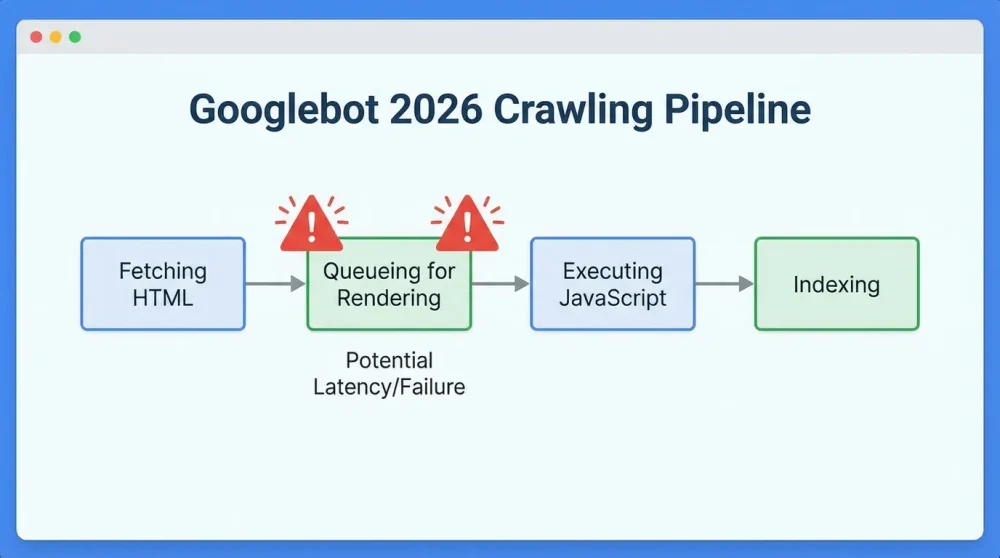
The Client-Side Rendering (CSR) vs. Indexing Latency Gap
Fundamentally, the core issue with traditional SPAs lies in the reliance on client-side rendering. When a bot arrives at a CSR page, it typically receives an empty HTML shell. Therefore, it must pause, fetch the JavaScript bundle, execute it, and only then can it see the content. In 2026, although processing power has increased, this extra step creates a measurable latency gap.
This delay is critical because search engines prioritize efficiency. If your content appears hundreds of milliseconds—or even seconds—after the initial request, you risk lower prioritization. Moreover, during periods of high server load or network instability, the bot might timeout before the virtual DOM is fully painted, resulting in a blank page being indexed.
Crawl Budget Implications for JS-Heavy Sites
Crawl budget remains a finite resource, especially for large enterprise sites with thousands of URLs. Because rendering JavaScript is computationally expensive, Googlebot cannot crawl JS-heavy pages as quickly as it crawls static HTML. Consequently, if your SPA relies entirely on client-side execution, you are effectively reducing the number of pages Google can index per day.
What Font Does Apple Use? The Complete Guide to Apple Typography (1984–2025)This efficiency loss is massive at scale. For example, an e-commerce SPA with a million products might find that only a fraction of its inventory is refreshed in the index regularly. Thus, optimizing rendering is not just about rankings; it is about ensuring your content gets discovered in the first place.
The ‘Two-Wave’ Indexing Process: Myth or Reality in 2026?
Historically, SEOs spoke of a distinct ‘two-wave’ indexing process: first the HTML crawl, then a delayed rendering crawl days later. In 2026, Googlebot rendering capabilities have largely merged these waves into a nearly simultaneous process for high-authority sites. However, ‘nearly’ is not ‘instant’.
For newer or smaller domains, the delay between fetching the HTML and executing the JavaScript can still exist. Furthermore, other search engines and social media bots often lack the sophisticated rendering pipeline of Google. Therefore, assuming the two-wave process is completely dead is a dangerous oversimplification that can hurt your cross-platform visibility.
How AI Search Bots (SGE) Parse JavaScript Content
With the dominance of AI Search Overviews (formerly SGE), the stakes have changed. AI bots are voracious consumers of text content to generate summaries. If your content is hidden behind a heavy layer of JavaScript hydration, these AI agents might skip your site in favor of one that provides immediate text availability.
In addition, AI models prioritize semantic clarity. If your SPA relies on complex DOM manipulations that obscure the logical flow of the document, the AI may fail to extract the correct answer. As a result, ensuring your raw HTML contains meaningful data is more important now than ever before.
Rendering Strategies: Choosing the Right Architecture
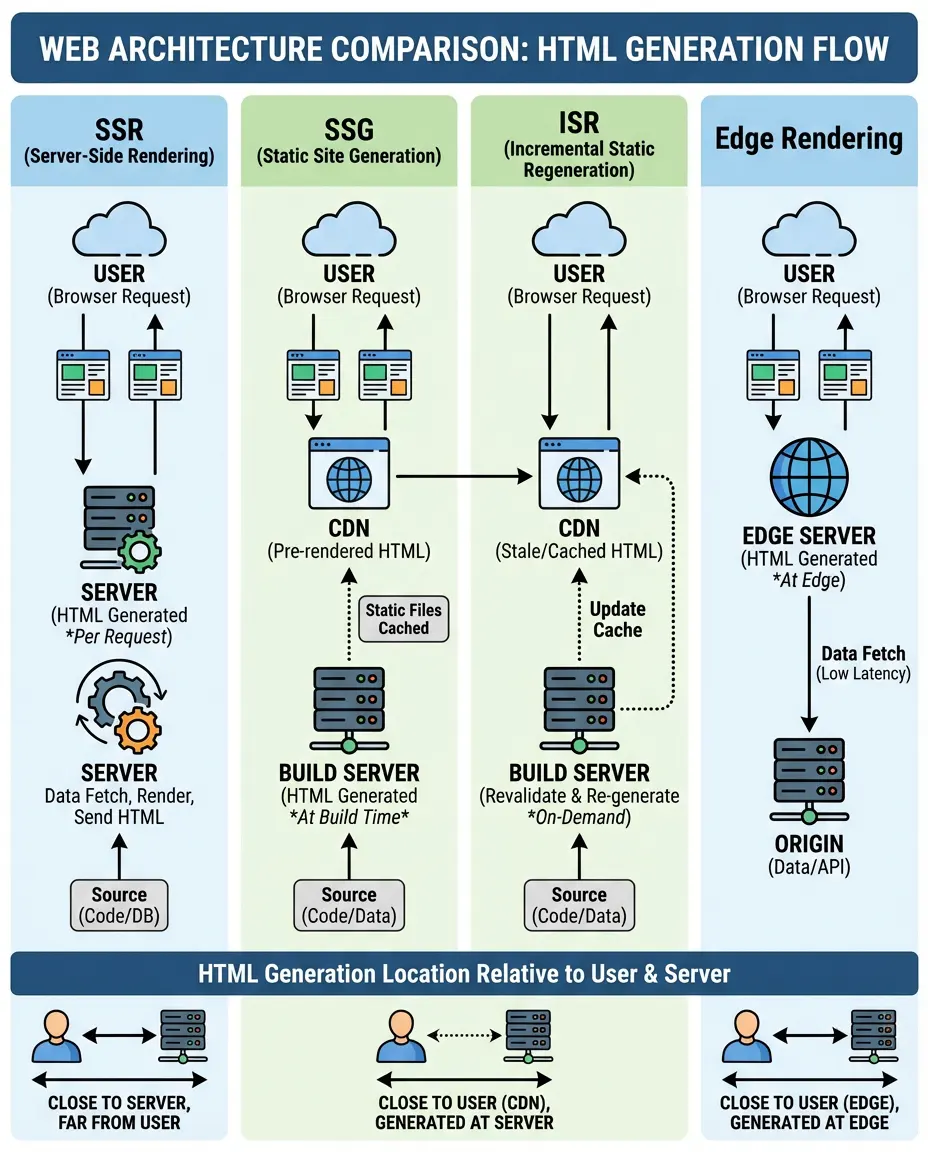
Client-Side Rendering (CSR): When it’s safe to use
Pure client-side rendering is generally discouraged for public-facing pages where SEO is a priority. However, it still has its place. For example, user dashboards, administrative panels, or content hidden behind a login do not need to be indexed. In these scenarios, the snappy, app-like feel of CSR is perfectly acceptable.
Nevertheless, for any page that requires organic traffic, relying on CSR is a liability. If you must use it, you need to accept that you are putting a heavy burden on the search engine’s resources. Thus, most 2026 architectures have moved away from pure CSR for marketing pages.
Server-Side Rendering (SSR): The Gold Standard for SEO
Server-side rendering (SSR) involves executing the application on the server and sending a fully populated HTML document to the client. This ensures that when Googlebot requests a URL, it immediately receives the content. For seo for single page application success, SSR is widely considered the gold standard.
SSR solves the indexing latency gap entirely. Because the content is present in the initial HTTP response, bots can parse links and text immediately. Furthermore, it improves the First Contentful Paint (FCP) for users, making the site feel faster even before the interactive JavaScript loads.
Static Site Generation (SSG): For immutable content
Prerendering via Static Site Generation (SSG) takes SSR a step further by generating the HTML at build time. This approach is ideal for blogs, documentation, and marketing pages that do not change frequently. Since the server simply serves a static file, the Time to First Byte (TTFB) is incredibly fast.
However, SSG can be challenging for very large sites. Building thousands of pages can take hours. In addition, real-time data is difficult to display without falling back to client-side fetching. Despite these limitations, for pure content sites, SSG offers unbeatable SEO performance.
Incremental Static Regeneration (ISR): Best of both worlds
Incremental Static Regeneration (ISR) allows you to update static pages after you have built your site. This allows developers to use SSG for the benefits of speed while retaining the ability to update content dynamically. For instance, e-commerce sites use ISR to update pricing without rebuilding the entire store.
This hybrid approach is highly effective for maintaining crawl budget efficiency. Google sees a fast static page, but users always see relatively fresh data. It effectively bridges the gap between the static and dynamic worlds.
Edge Side Rendering (ESR): Reducing latency
Edge rendering pushes the rendering logic to the CDN edge, closer to the user. Instead of a central server in Virginia rendering a page for a user in Tokyo, a server in Tokyo handles it. This drastically reduces network latency.
In 2026, frameworks like Next.js and Nuxt have native support for edge middleware. Consequently, you can personalize content and execute dynamic rendering logic at near-static speeds. This is a game-changer for international SEO.
Partial Hydration and Islands Architecture (Astro/Fresh)
The concept of islands architecture, popularized by frameworks like Astro, has revolutionized performance. Instead of hydrating the entire page, only specific interactive components (islands) are hydrated. The rest of the page remains static HTML.
This drastically reduces the JavaScript payload. As a result, metrics like Interaction to Next Paint (INP) improve significantly. For SEO, this means bots get fast HTML, and users get a performant page that feels interactive where it matters.
Resumability (Qwik): Eliminating hydration costs
Resumability, a concept championed by Qwik, challenges the need for hydration entirely. Instead of re-executing JavaScript to attach event listeners, the application ‘resumes’ from where the server left off. This creates an almost zero-JavaScript footprint during the initial load.
For 2026 SEO, this is massive. It eliminates the main thread blocking that often hurts Core Web Vitals. By removing the hydration overhead, you ensure that your SPA is as fast as a traditional multi-page application.
Technical Implementation for Crawlability
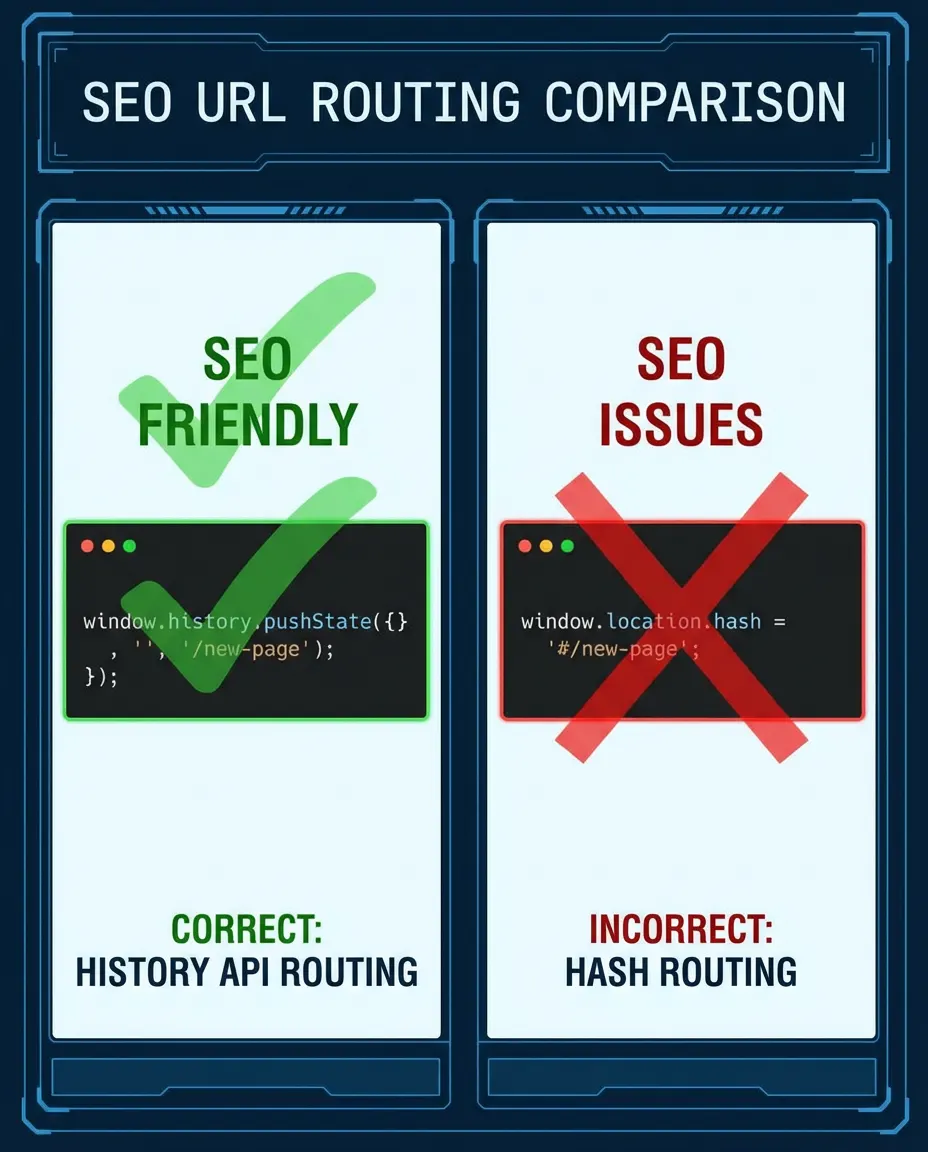
Routing: Using the History API (pushState) over Hash URLs (#)
A critical technical requirement is using the History API and pushState for routing rather than hash fragments. In the past, SPAs used URLs like example.com/#/about. However, Google traditionally ignores everything after the # symbol. Therefore, content served on hash URLs often fails to get indexed separately.
Modern routers in React, Vue, and Angular default to history mode, which produces clean URLs like example.com/about. You must ensure your server is configured to handle these requests. If a user lands directly on a deep link, the server must return the main index.html file so the client-side router can take over.
Internal Linking: Utilizing real <a href> tags vs. onClick events
One of the most common mistakes is using div or button elements with onClick handlers for navigation. While this works for users, it is invisible to crawlers. Googlebot looks for <a href> tags to discover new pages. Consequently, if your navigation relies on JS events, your internal linking structure is broken.
You must use standard anchor tags. Framework-specific components like <Link> in Next.js render as proper anchor tags in the DOM. This ensures that link equity flows through your site and bots can discover deep content efficiently.
Lazy Loading content without blocking crawlers
Lazy loading is great for performance, but it can be dangerous for SEO if not done correctly. If text content is only loaded when a user scrolls (Intersection Observer), a bot that doesn’t scroll might never see it. In 2026, Googlebot is better at resizing viewports, but it is not perfect.
The best practice is to use native lazy loading for images but ensure text content is present in the DOM on load. Alternatively, use content-visibility: auto CSS property to improve rendering performance without hiding content from the parser.
Managing Robots.txt and Sitemap.xml dynamically
In a SPA environment, your sitemap.xml and robots.txt often need to be generated dynamically, especially if you have user-generated content. You cannot rely on a static file if your inventory changes hourly. Frameworks now allow you to create API routes that serve these XML files on demand.
Ensure that your robots.txt does not block the API endpoints your SPA needs to fetch content. If Googlebot cannot access your data API, it cannot render the page. This is a common dynamic rendering configuration error.
Handling Status Codes (200, 404, 301) in a Virtual DOM environment
SPAs running in the browser naturally return a 200 OK status code for the index.html file, even if the content inside represents a page not found error. This creates a soft 404 error. Google hates soft 404s because they waste crawl budget on non-existent pages.
To fix this, your server-side rendering logic must define the status code before the response is sent. In Next.js or Nuxt, you can set the response context to 404 if the data fetch returns null. This ensures Google receives the correct signal and drops the URL from the index.
Managing Metadata and Structured Data
Dynamic Meta Tags injection (React Helmet, Next.js Metadata API, Vue UseHead)
Meta tags must be unique for every URL in your SPA. In the past, libraries like React Helmet were the go-to solution for injecting tags into the <head>. In 2026, modern frameworks have built-in solutions, such as the Metadata API in Next.js 16, which are more performant and SSR-compatible.
It is vital that these tags are present in the server-rendered HTML. If they are only injected after client-side hydration, social media crawlers (like Twitter/X bot or LinkedIn bot) will likely miss them, resulting in broken share previews. Always verify your source code to ensure the title and description are present.
Open Graph and Twitter Cards for Social Sharing
Social SEO is part of the holistic strategy. Open Graph tags ( og:title, og:image ) must be dynamically populated based on the page content. For a product page, the og:image should match the specific product image, not a generic site logo.
Because social bots do not execute JavaScript, server-side rendering or edge injection is mandatory here. If you rely solely on client-side JS to update these tags, your links will look unprofessional when shared on platforms like Slack or WhatsApp.
Canonical Tags management in SPAs
Canonical tags prevent duplicate content issues, which are rampant in SPAs due to URL parameters. For instance, filtering a product list might change the URL to ?sort=price, but the content is largely the same. You need a self-referencing canonical tag that points to the clean version of the URL.
Logic must be implemented in your router or head management library to strip unnecessary parameters from the canonical tag. This tells Google exactly which version of the URL to prioritize in the index.
Injecting JSON-LD Schema via JavaScript
Structured data injection helps Google understand your content entities. Fortunately, Google has supported dynamically injected JSON-LD for years. You can insert the script block via JavaScript into the DOM, and Google will read it.
However, implementation errors are common. Ensure that you are not generating duplicate schema blocks during hydration. Use valid JSON formatting and test that the entity IDs remain consistent between renders to avoid confusing the knowledge graph.
Testing rich snippets rendering
After implementing schema, you must validate it using Google’s Rich Results Test. In 2026, simply having valid code isn’t enough; the visual content must match the schema data. If you mark up a price of $50, but the user sees $60 due to a client-side update, Google may penalize the snippet.
Regularly monitor your Search Console for ‘Unparsable structured data’ errors. These often spike after code deployments that inadvertently break the string escaping in your JSON-LD blocks.
Framework-Specific SEO Guides (2026 Editions)
React & Next.js (App Router Optimization)
In 2026, Next.js SEO revolves entirely around the App Router. The generateMetadata function allows you to fetch data and define tags asynchronously on the server. This is a massive improvement over older methods. Ensure you are utilizing sitemap.ts for dynamic sitemap generation.
For pure React apps without a meta-framework, you are fighting an uphill battle. If you cannot migrate to Next.js or Remix, consider using a prerendering service like Prerender.io. However, the industry standard is to adopt the server capabilities of Next.js for robust SEO.
Vue.js & Nuxt (SEO Modules)
Nuxt SEO capabilities are best-in-class. The Nuxt SEO module provides out-of-the-box support for sitemaps, robots, and schema. Leveraging useSeoMeta allows for a developer-friendly way to define tags that work perfectly with SSR.
Pay attention to the hydration modes. Nuxt allows you to define route rules. For highly static pages, use prerender: true in your nuxt.config.ts. This generates static HTML for those routes, ensuring maximum speed and crawlability.
Angular & Analog/SSR (Signal-based meta handling)
When considering how to optimize an angular single page application for seo, the conversation has shifted to Angular’s hydration and the Analog meta-framework. Angular 19+ introduced non-destructive hydration, which solves the flickering issues of the past. Use the Meta service deeply integrated with Signals to update tags reactively.
Server-Side Rendering in Angular is now more stable. Ensure server.ts is configured to handle 404s correctly, as Angular apps often default to redirecting to the home page on error, which is an SEO disaster (Soft 404).
SvelteKit (Adapter configuration)
SvelteKit’s adapter system allows you to deploy to any environment, from Node servers to Edge workers. For SEO, the specific adapter matters. Ensure your adapter supports proper header manipulation so you can serve correct status codes.
SvelteKit handles SEO via the “ element. It is simple but effective. Make sure you are not putting critical SEO content inside {#await} blocks that only resolve on the client, as this delays the content visibility for the bot.
Core Web Vitals & Performance Optimization
Optimizing Interaction to Next Paint (INP) in heavy JS apps
Interaction to Next Paint (INP) has replaced FID as a core metric. For SPAs, this is critical because hydration often blocks the main thread. If a user clicks a menu while the browser is busy hydrating a massive React component, the INP score suffers. In 2026, Google penalizes sluggish interfaces heavily.
To optimize INP, you must yield to the main thread frequently. Break up long tasks using setTimeout or requestIdleCallback. Furthermore, reduce the size of your hydration bundle. The less JavaScript that needs to execute on load, the faster the browser can respond to user input.
Reducing Largest Contentful Paint (LCP) via preloading
LCP measures loading performance. In SPAs, the LCP element is often an image or a large text block. If this element is rendered via client-side JavaScript, LCP will be poor. You must ensure the LCP element is included in the initial server HTML.
Additionally, use resource hints. Adding “ for your hero image can shave hundreds of milliseconds off your LCP. Do not rely on lazy loading for the LCP image; it should be eager loaded.
Minimizing Cumulative Layout Shift (CLS) during hydration
CLS occurs when elements move around as the page loads. In SPAs, this often happens when data loads asynchronously and pushes content down. For example, a banner ad loading late might shift the entire article body.
You must reserve space for dynamic elements. Use CSS aspect-ratio for images and min-height for text containers. Skeleton screens are also effective; they hold the layout structure in place while the data is fetched, preventing layout shifts.
Code Splitting and Tree Shaking strategies
Monolithic bundles are the enemy of speed. Code splitting allows you to split your code into smaller chunks that are loaded on demand. Tools like Webpack and Vite handle this, but you must configure them correctly. Ensure that route-based code splitting is active.
Tree shaking removes unused code. In 2026, verify that your dependencies are side-effect free. If you import a huge library just for one function, you are bloating your bundle. Import only what you need to keep the initial payload light.
Resource Hints (dns-prefetch, preconnect, preload)
Resource hints tell the browser what to do next. Use dns-prefetch and preconnect for third-party domains like your CDN or analytics provider. This handles the DNS lookup and handshake before the resource is actually requested.
Be careful with preload. Over-preloading can clog the network bandwidth and delay the parsing of CSS. Use it sparingly for high-priority assets like fonts and the LCP image.
Common SPA SEO Pitfalls to Avoid
The Soft 404 Error trap
The soft 404 errors trap is the most pervasive issue in SPA SEO. This occurs when a user requests a non-existent URL, and the SPA displays a ‘Page Not Found’ message but serves a 200 OK status code. Search engines interpret this as a valid page with thin content.
To avoid this, you must handle routing logic on the server. If a database lookup fails, the server response header must be 404. Relying on client-side logic to render a 404 component is insufficient for bots. Check your server logs to ensure 404s are being reported correctly.
Bloated JavaScript bundles blocking indexing
Excessive JavaScript file size delays parsing. If your bundle is 5MB, a mobile device might take seconds to parse it. Googlebot has a timeout; if the script takes too long to execute, the renderer may give up, leaving you with an unindexed page.
Audit your bundles regularly. Remove unused libraries. A common culprit is importing the entire Lodash library or heavy moment.js alternatives. Switch to lightweight libraries to ensure your app stays within the processing budget of the crawler.
Unintended infinite scroll indexing issues
Infinite scroll is a popular UX pattern but a nightmare for SEO if not handled well. Googlebot cannot ‘scroll’ like a human. It will not trigger the event to load more items. Consequently, products on page 2, 3, and beyond remain invisible.
The solution is to use paginated URLs behind the scenes. Use pushState to update the URL as the user scrolls (e.g., /page/2). Ensure that there are standard <a href> pagination links available in the DOM (even if hidden from users) so the bot can crawl through the sequence.
Content requiring user interaction to load (Click-to-reveal)
Content hidden behind Click to Read More buttons or tabs is often devalued or ignored. While Google claims to index hidden content on mobile, experience shows that visible content carries more weight. In the context of SPAs, if the content is not in the DOM until the click happens, it is invisible.
Ensure that all SEO-critical text is in the DOM on initial load. You can use CSS to hide it visually, but it must be present in the HTML. Do not fetch this content via an API call triggered by a click event.
Timeout issues with rendering services
If you use dynamic rendering services, timeouts can occur. If your backend API is slow, the rendering service might time out waiting for the page to build. It will then return a 503 error or a blank page to Google.
Monitor the performance of your rendering pipeline. Implement aggressive caching for your rendered pages. If a page takes more than 5 seconds to render, you are in the danger zone for crawl failures.
Testing & Monitoring Tools
Google Search Console: URL Inspection Tool (View Crawled Page)
The URL Inspection Tool in GSC is your first line of defense. Use the Test Live URL feature and click View Crawled Page. Look specifically at the HTML tab. Does it contain your content? If you see empty div tags where your content should be, you have a rendering issue.
In addition, check the Screenshot tab. This shows you exactly what Googlebot saw. If the screenshot is blank or missing critical elements, your JavaScript is failing to execute within the bot’s environment.
Mobile-Friendly Test (Live Test)
The Mobile-Friendly Test acts as a secondary verification tool. It uses the same evergreen Googlebot renderer. It is useful for quick checks without needing access to the full Search Console property. It also highlights resource loading errors that might block rendering.
Pay attention to the ‘Page loading issues’ section. It will list any resources (scripts, images, CSS) that the bot could not load. If your main bundle script is blocked by robots.txt or times out, it will appear here.
Lighthouse & Web Vitals Extension
Use Lighthouse for lab data. It simulates a mid-tier mobile device, giving you a realistic view of performance. Run audits specifically for SEO and Performance. The Web Vitals Chrome extension is also excellent for real-time checking of LCP and CLS as you browse.
Remember that Lighthouse scores are simulations. They do not replace real user data (CrUX), but they are invaluable for identifying architectural bottlenecks during development.
Headless Chrome testing (Puppeteer/Playwright)
For automated testing, set up Puppeteer or Playwright scripts. These tools allow you to script a headless browser to visit your pages and scrape the content. This mimics the Googlebot experience programmatically.
You can integrate this into your CI/CD pipeline. Fail the build if the headless browser cannot find the H1 tag or if the meta description is missing. This prevents bad code from ever reaching production.
Server-side log analysis for bot hits
Log analysis is the advanced SEO’s secret weapon. By analyzing server logs, you can see exactly when Googlebot requests your pages and what status codes it receives. Look for patterns of 404s or 500 errors on JS files.
If you see Googlebot requesting your `.js` bundles frequently, it’s a good sign it is trying to render. If it only requests the HTML and never the JS, it might be treating your page as static and missing the dynamic content.
Frequently Asked Questions
How does Google handle JavaScript rendering in 2026?
In 2026, Google’s Web Rendering Service (WRS) is highly advanced, utilizing a headless version of Chromium that is regularly updated. It generally renders JavaScript immediately after crawling the HTML. However, google indexing javascript problems 2026 still exist regarding crawl budget; rendering takes significantly more resources than simple HTML parsing, so massive sites may still experience delays or partial indexing if they rely too heavily on client-side execution.
Is Server-Side Rendering (SSR) still necessary for SPA SEO?
Yes, Server-Side Rendering remains the most robust strategy for maximizing SEO potential. While Google can render client-side content, SSR guarantees that the complete content is available in the initial HTTP response. This improves crawl speed, eliminates the risk of rendering timeouts, and ensures compatibility with social media bots and AI crawlers that may not execute JavaScript.
How do I manage meta tags dynamically in React/Vue/Angular?
You should use framework-specific meta-frameworks or libraries designed for this purpose. For react single page application seo best practices 2026, use the Metadata API in Next.js or React Helmet for legacy apps. In Vue, use the `useSeoMeta` composable in Nuxt. In Angular, utilize the Meta service. Crucially, ensure these changes are reflected in the server-rendered HTML, not just the client-side DOM.
What is the impact of Interaction to Next Paint (INP) on SPA rankings?
Interaction to Next Paint is a Core Web Vital and a ranking factor. SPAs are particularly vulnerable to poor INP scores because the browser main thread is often busy executing hydration logic when a user tries to interact. A poor INP score sends a negative signal to Google about page experience, which can demote your rankings even if your content is relevant.
How do I fix ‘soft 404’ errors in single page apps?
To fix soft 404 errors, you must ensure your server returns a 404 HTTP status code when a requested resource does not exist. In a SPA, simply showing a ‘Not Found’ component is not enough. You must implement server-side logic (using middleware or server functions in frameworks like Next.js/Nuxt) to intercept the invalid request and set the correct status code before the response is sent.
Does using the History API vs Hash routing affect SEO?
Yes, significantly. Google historically ignores the fragment identifier (everything after the `#`). Therefore, content served on hash URLs is difficult to index individually. Using the History API (`pushState`) enables standard URL structures (e.g., `/products/123`) which Google can crawl, index, and rank as distinct pages.
How do I optimize SPAs for AI Search Overviews?
Optimization for AI Search Overviews involves ensuring your content is semantically structured and text-rich in the initial HTML. AI bots prioritize fast, readable text to generate answers. Use clear headings, list items, and schema markup. Avoid hiding answer-worthy content behind complex user interactions or heavy JavaScript loading states.