AI video generators have transformed content creation, making it faster and more accessible. However, improper use can lead to low-quality results, poor engagement, and missed opportunities. From over-relying on automation to neglecting video editing software for final touches, creators often make common mistakes that affect their videos’ effectiveness. Tools like CapCut offer AI-powered features to enhance videos, but understanding their limitations is key to achieving professional results. In this article, we’ll explore the top 10 mistakes to avoid when using AI video generators and how to optimize your workflow for high-quality, engaging video content.
Common mistakes to avoid when using AI video generators
AI video generators have made content creation faster and more efficient. However, relying solely on automation without understanding its limitations can lead to errors that impact video quality and engagement. Below are ten common mistakes to avoid when using AI-powered video tools:
- Over-reliance on automation
AI tools are designed to assist, not replace, human creativity. Many creators assume AI can handle everything, from scriptwriting to editing, but human input is essential for storytelling, brand alignment, and emotional appeal. AI-generated videos need a personal touch to feel authentic and engaging. - Ignoring customization options
Most AI video generators provide default settings for animations, transitions, and text overlays. However, failing to customize these elements results in generic-looking content. Adjusting fonts, colors, effects, and branding elements ensures that videos align with your brand identity and stand out from the competition. - Poor script planning
AI tools can generate visuals and voiceovers, but they lack human intuition in structuring a compelling narrative. Without a clear and engaging script, videos can feel disorganized or irrelevant. Planning a strong script before using an AI generator ensures a cohesive and impactful final product. - Skipping post-production edits
AI-generated videos often require refinements to meet professional standards. Using a video editing software like CapCut allows users to fine-tune visuals, adjust pacing, add transitions, and enhance storytelling. Editing manually ensures the final video looks polished and professional. - Inaccurate AI-generated captions
AI-generated subtitles are convenient but not always 100% accurate. Misinterpretations or incorrect punctuation can confuse viewers. Reviewing and editing subtitles with an AI caption generator ensures better accuracy, making videos more accessible to a global audience. - Using low-quality assets
Even the best AI video generators can’t compensate for poor-quality images, videos, or audio. High-resolution visuals, clear voiceovers, and well-balanced background music significantly impact the viewer’s experience. AI tools work best when provided with quality inputs. - Neglecting audience preferences
Not all AI-generated videos resonate with every audience. Creators who fail to consider their target demographic risk producing content that feels irrelevant or unengaging. Understanding the audience’s interests, pain points, and preferences is key to crafting impactful AI videos. - Ignoring AI limitations
While AI can generate text-to-video, it lacks emotional nuance and human-like expression. AI text-to-speech tools often sound robotic, making voiceovers less engaging. Adjusting voice tones, pacing, and pronunciation helps create a more natural-sounding experience. - Not optimizing for different platforms
AI-generated videos need to be optimized for different formats and aspect ratios depending on the platform—whether it’s YouTube, Instagram Reels, or TikTok. Failing to adjust to these specifications can result in poor visibility, awkward cropping, or loss of critical visual elements. - Overcomplicating AI effects
AI tools offer various effects, animations, and transitions, but overusing them can make videos feel artificial or cluttered. A clean, simple, and professional approach with minimal but impactful effects enhances viewer engagement without overwhelming them.
Best practices for effective AI video creation
- Plan your content strategically: AI tools streamline video production, but a well-structured script and storyboard are essential. Define your video’s objective, audience, and key message before generating content to ensure clarity and impact.
- Use high-quality assets: AI video generators perform best with high-resolution images, crisp audio, and explicit video clips. Providing quality inputs enhances the overall output, making the video more visually appealing and professional.
- Customize AI-generated content: Default AI settings can make videos look generic. Customize text, transitions, animations, and branding elements to align with your brand identity and create a unique, engaging experience.
- Optimize for different platforms: AI-generated videos should be formatted correctly for different platforms. Adjust aspect ratios, video lengths, and captions to ensure compatibility with YouTube, TikTok, Instagram, and other social media channels.
- Review and refine AI-generated captions: AI tools like AI caption generators enhance accessibility, but they may produce errors. Always proofread and edit captions to improve accuracy and readability, ensuring a seamless viewer experience.
- Balance AI automation with human creativity: While AI speeds up production, human input is crucial for emotional depth and storytelling. Combining AI-generated visuals with manual edits in tools like CapCut ensures polished, high-quality videos that resonate with audiences.
How to use CapCut for professional editing and customization
CapCut offers a robust suite of professional editing and customization tools, allowing users to enhance videos with precision. From advanced text effects and transitions to AI-powered automation, CapCut helps create polished, high-quality content. Below are the key steps to maximize its features for professional editing.
Step 1: Launch CapCut and import your video
Begin by downloading and installing CapCut Desktop Video Editor on your PC. Open the application and create a new project by selecting “Create Project.” To add your video files, click “Import” or simply drag and drop them into the media library. Keeping CapCut updated ensures you have access to its latest AI-powered tools and features.
WordPress Widgets: What They Are and How to Use Them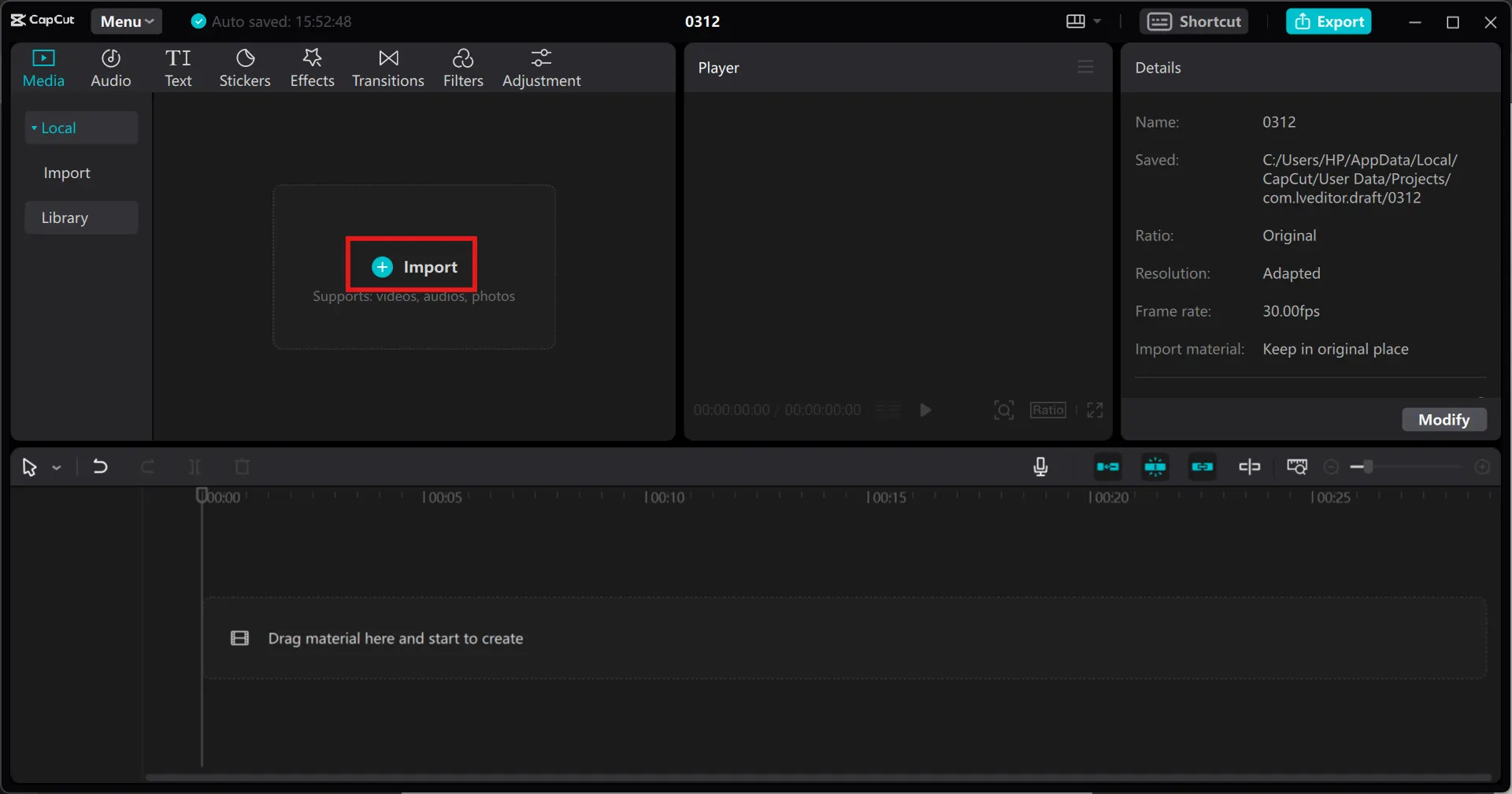
Step 2: Enhance your video with text and effects
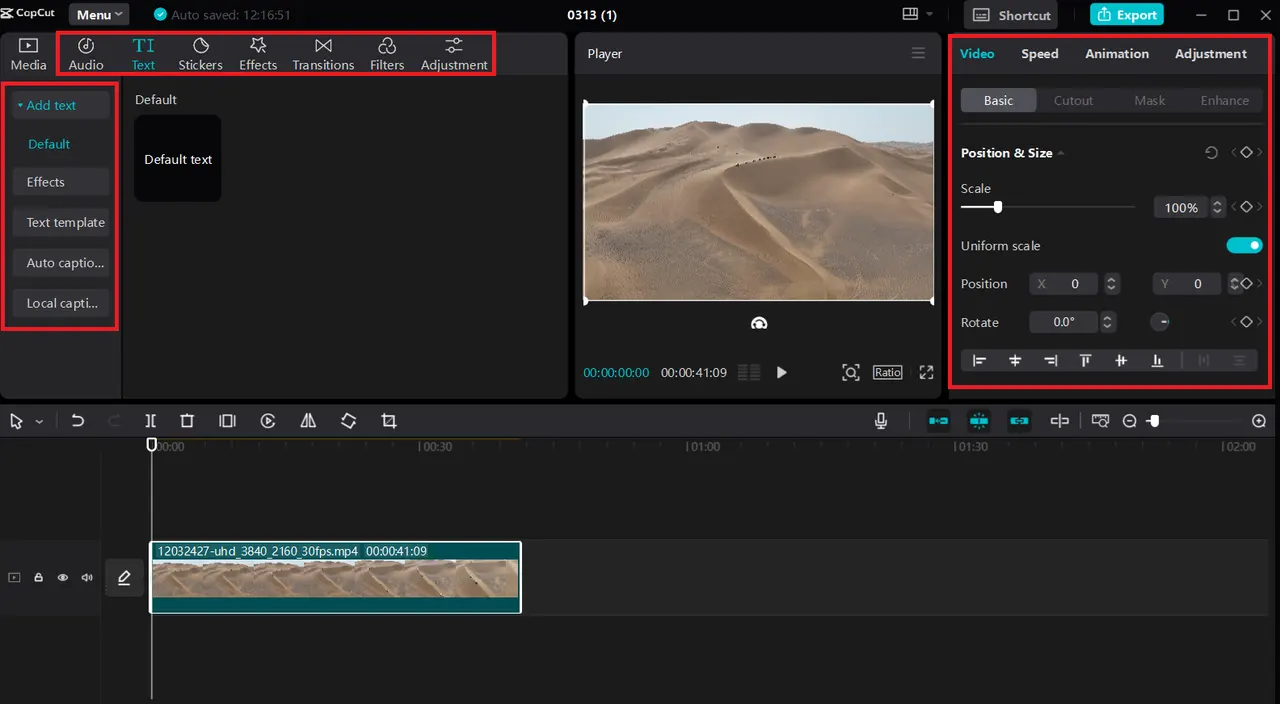
Once your video is uploaded, enhance it with engaging elements. Use CapCut’s Text Tool to add captions, subtitles, or titles, making your content more accessible and interactive. Customize the font style, size, and color to align with your theme. Add text animations for a dynamic touch. You can also incorporate royalty-free music, sound effects, filters, and other visual enhancements to elevate your video’s quality and appeal.
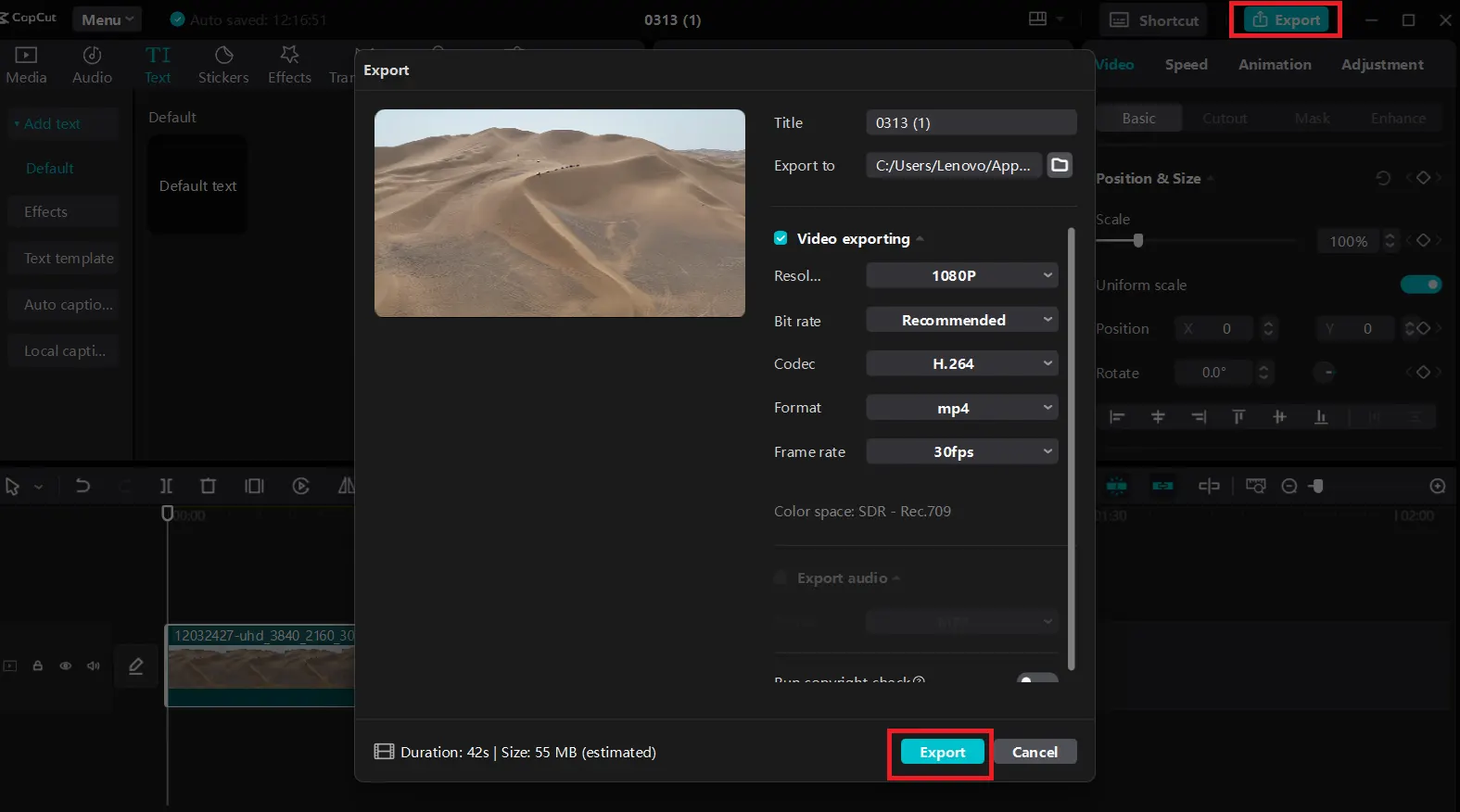
Step 3: Export and share your video
Augmented Reality: What Is It and Examples of UseAfter finalizing your edits, click the “Export” button in the top-right corner. Adjust the resolution and format settings to meet your needs, then hit “Export” again to save your video. Your AI-enhanced video is now ready to be shared across educational platforms, social media, or marketing channels for maximum impact.
Conclusion
AI video generators have revolutionized content creation, making it faster, more efficient, and accessible to everyone. However, avoiding common mistakes and following best practices ensures high-quality, professional results. CapCut, with its intuitive interface and advanced AI tools, simplifies video editing by offering powerful customization features, text enhancements, and seamless exporting options. Whether for e-learning, marketing, or social media, AI-powered tools like CapCut help creators produce compelling, engaging videos with ease. By mastering these tools, users can unlock the full potential of AI-driven video editing while maintaining creativity and precision in their projects.
10 Alternative Best Backpage Sites